
A quiet earbud can make a good pair feel almost useless. Music leans to one side. Voices sound distant. Turning up the volume only makes the working earbud too loud.
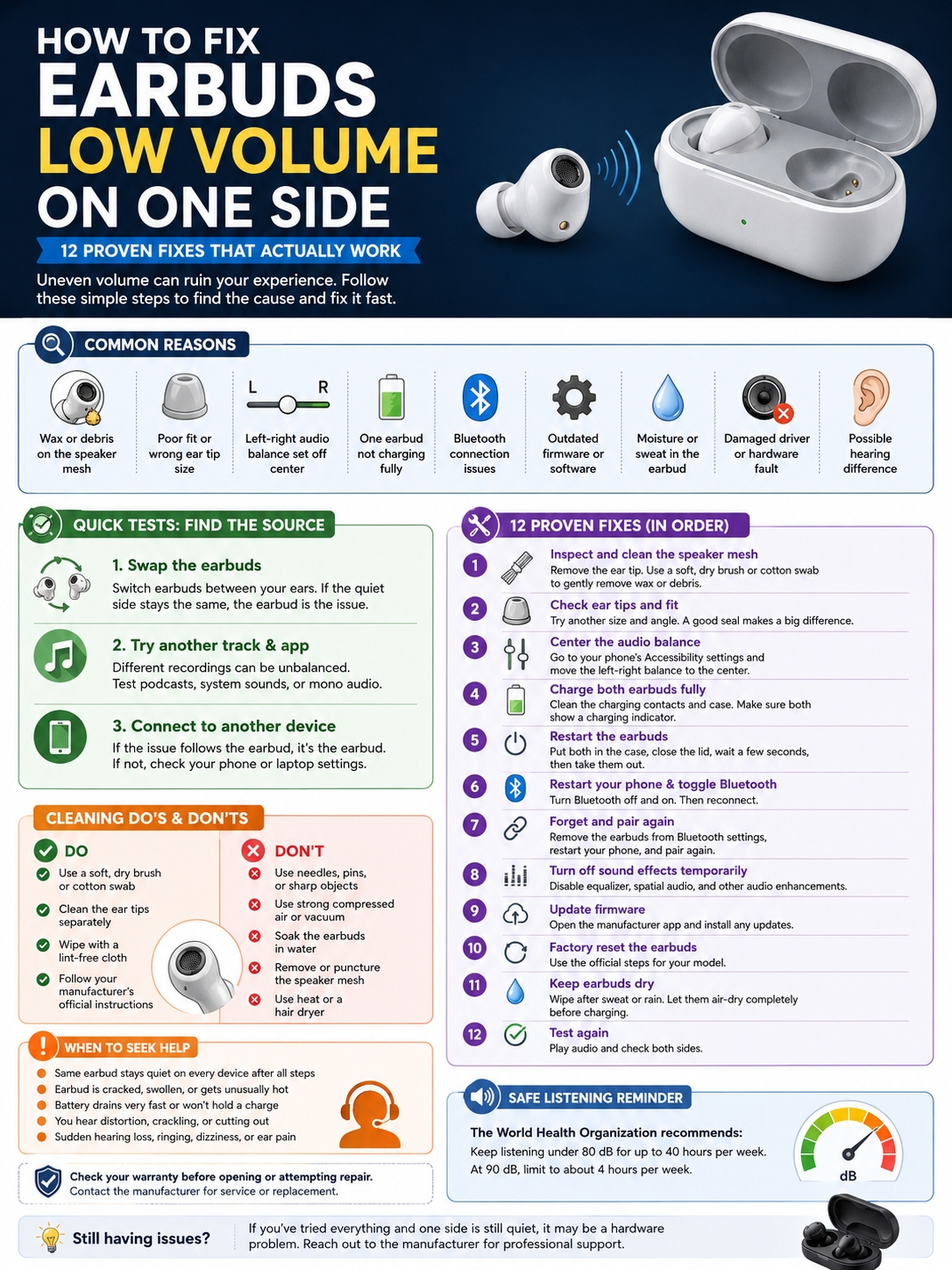
When you’re dealing with earbuds low volume one side, the cause is often simple. Wax may be covering the speaker mesh. The ear tip may not fit well. Your phone’s audio balance may have shifted. One bud may also have a charging, Bluetooth, or firmware problem.
A broken speaker is possible, but don’t jump to that conclusion yet. Start with the easy checks. Test the earbuds, clean them safely, and work through the settings one by one.
Here’s how to find the cause and fix it without damaging your earbuds.
Why Is One Earbud Quieter Than the Other?
Earbuds use tiny speakers and even smaller sound openings. It doesn’t take much dirt to affect them. A thin layer of wax, oil, dust, or lint can noticeably cut the volume.
Apple tells users to inspect the speaker and microphone meshes when one AirPod sounds quieter. Samsung gives similar advice for Galaxy Buds and also points to fit, audio balance, and connection issues as common causes.
The usual reasons include:
- Wax or dirt on the speaker mesh
- A loose or damaged ear tip
- The wrong ear-tip size
- Left-right audio balance set off-center
- One earbud not charging properly
- A temporary Bluetooth glitch
- Old earbud firmware
- Equalizer or spatial-audio settings
- Sweat or moisture inside an opening
- A damaged speaker, cable, or connector
- A hearing difference between your ears
|
Likely cause |
What it sounds like |
First thing to check |
|
Blocked speaker mesh |
Muffled or weak sound |
Inspect and clean the quiet side |
|
Poor ear-tip seal |
Thin sound and weak bass |
Try another tip size |
|
Shifted audio balance |
One side stays quieter |
Center the balance slider |
|
Charging problem |
One bud shows less battery |
Clean the contacts and recharge |
|
Bluetooth glitch |
Problem starts suddenly |
Disconnect and pair again |
|
Moisture |
Distortion after sweat or rain |
Stop using and let it dry |
|
Hardware damage |
Same side stays quiet everywhere |
Contact the manufacturer |
|
Hearing issue |
Different earbuds sound quiet in the same ear |
Get your hearing checked |
Earbuds Low Volume One Side: Test the Source First
Before you clean, reset, or change anything, find out where the problem is coming from. It could be the earbud. It could be your phone. It could also be your ear.
Swap the Earbuds Between Your Ears
Put the left earbud in your right ear and the right earbud in your left. They don’t need to fit perfectly. You’re only comparing the volume.
Here’s what the result tells you:
- If the same physical earbud stays quiet, the earbud is likely the problem.
- If the low volume stays in the same ear, the fit or your hearing may be involved.
- If the sound becomes balanced after moving them, the original fit may have been poor.
This simple test can save you a lot of time.
Read Also: Best Wireless Earbuds Under $100 in 2026
Try Another Track and App
Not every recording has equal sound in both channels. Some songs place vocals or instruments more heavily on one side.
Try a few different sources:
- A spoken podcast
- A different music app
- A phone notification
- A video with centered dialogue
- A mono audio track
You can also switch on Mono Audio for a quick test. Mono combines both channels and sends the same sound to each earbud. That makes volume differences easier to spot.
Connect the Earbuds to Another Device
Pair the earbuds with another phone, tablet, or computer.
If the same earbud is still quiet, focus on the earbud itself. If both sides sound normal on the second device, the first phone probably has a setting, app, or Bluetooth problem.
|
Test result |
What it probably means |
What to do next |
|
Same earbud stays quiet |
Blockage or hardware issue |
Inspect and clean it |
|
Quiet sound stays in one ear |
Fit or hearing issue |
Change the tip and test another headset |
|
Earbuds work on another phone |
Device or connection problem |
Check settings and pair again |
|
Only one app sounds wrong |
App setting or recording issue |
Reset that app’s audio settings |
|
Mono sounds balanced |
Stereo mix or audio processing issue |
Test more tracks |
Clean the Quiet Earbud Safely
Cleaning is one of the best fixes for earbuds low volume one side. It’s also the step people most often get wrong. Different brands use different materials and mesh designs. That means you should check the official cleaning guide for your exact model before using any liquid.
Samsung usually recommends a soft, dry brush or cotton swab for Galaxy Buds. Apple has model-specific cleaning steps for different AirPods versions.
Inspect the Speaker Mesh
Start here:
- Remove the silicone or foam tip, if your earbuds use one.
- Hold the earbud under a bright light.
- Compare the quiet side with the louder side.
- Look for wax, oil, dust, or lint.
The blockage may be hard to see. Even a thin film can lower the sound.
Dry-Clean the Earbud
Unless the manufacturer says otherwise:
- Hold the speaker opening downward.
- Use a clean, soft, dry brush.
- Brush lightly across the mesh.
- Let loose dirt fall away.
- Wipe the outer shell with a lint-free cloth.
Don’t push the brush through the mesh. The mesh protects the speaker and helps shape the sound.
Clean the Ear Tips Separately
Take removable silicone tips off before cleaning them. Some can be rinsed. Others need a dry wipe. Follow the instructions for your model. Let the tips dry fully before putting them back. A damp ear tip can trap moisture against the speaker.
Skip Risky Cleaning Tricks
You may find videos suggesting needles, suction, compressed air, or mesh removal. Don’t do it.
Avoid:
- Pins or needles
- Toothpicks
- Metal brushes
- Strong compressed air
- Vacuum cleaners
- Household cleaning sprays
- Unapproved solvents
- Blowing or sucking through the mesh
- Hair dryers
- Removing the speaker mesh
These methods can push dirt deeper, tear the filter, or damage the speaker.
|
Cleaning method |
Good idea? |
Why |
|
Soft, dry brush |
Usually |
Removes loose dirt safely |
|
Dry cotton swab |
Usually |
Works well on tips and outer surfaces |
|
Lint-free cloth |
Yes |
Safe for the casing |
|
Official model-specific method |
Yes |
Matches the earbud’s materials |
|
Needle or pin |
No |
Can puncture the mesh |
|
Strong compressed air |
No |
Can push debris farther inside |
|
Soaking the earbud |
No |
Water resistance isn’t waterproofing |
|
Removing the mesh |
No |
Can change the sound and damage the speaker |
Check the Ear Tip and Fit
Sometimes the earbud isn’t actually quieter. It just isn’t sealed properly. A loose fit lets outside noise in and bass out. The result feels like low volume, especially on music and videos.
Try this:
- Remove and reinstall the ear tip.
- Check for wax, tears, or stretching.
- Try a larger size.
- Try a smaller size.
- Rotate the earbud gently after inserting it.
- Use the fit test in the companion app, if available.
Your ears may need different tip sizes. That’s normal. One side may fit best with a medium tip while the other needs a large one. A poor fit can also affect noise cancellation. When one side leaks more outside noise, it may sound quieter even when the speaker is fine.
|
Fit problem |
What you may notice |
Fix |
|
Tip is too small |
Weak bass and more outside noise |
Try a larger tip |
|
Tip is too large |
Discomfort or shallow fit |
Try a smaller tip |
|
Tip is damaged |
Loose or unstable seal |
Replace it |
|
Earbud sits at the wrong angle |
Volume changes when you touch it |
Reinsert and rotate |
|
Tip contains wax |
Muffled sound |
Remove and clean it |
|
Ears have different shapes |
One side never seals well |
Use different tip sizes |
Correct the Left-Right Audio Balance
A shifted balance setting can make one earbud much quieter, even when both earbuds work perfectly.
On iPhone or iPad
Go to:
Settings > Accessibility > Audio & Visual > Balance
Move the slider to the center. Apple recommends checking this setting when one AirPod sounds louder or quieter than the other.
On Samsung Galaxy Phones
The menu name may vary, but it’s usually under:
Settings > Accessibility > Hearing enhancements > Left/right sound balance
Galaxy Buds users can also check the accessibility or hearing settings inside the Galaxy Wearable app. Make sure the slider sits in the middle.
On Other Android Phones
Search your phone’s Settings app for:
- Audio balance
- Left/right balance
- Hearing enhancements
- Accessibility audio
- Mono audio
Keep the balance centered while testing. You can move the slider toward the quiet earbud as a temporary workaround, but that doesn’t fix wax, a poor fit, or a damaged speaker.
|
Device |
Setting to check |
Best position |
|
iPhone or iPad |
Accessibility > Audio & Visual |
Center |
|
Samsung Galaxy |
Accessibility > Hearing enhancements |
Center |
|
Galaxy Wearable |
Accessibility or hearing settings |
Center |
|
Other Android phones |
Search “audio balance” |
Center |
|
Music app |
Balance or pan control |
Default |
Recharge Both Earbuds and Check the Contacts
Each wireless earbud has its own battery. It also has its own charging contacts. One bud may look like it’s sitting correctly in the case while failing to charge. Place both earbuds in the case and check whether each one shows a charging indicator.
Look for:
- Dirt on the charging contacts
- Dust inside the case
- A stuck charging pin
- One bud sitting higher than the other
- A large gap between the two battery levels
Clean the contacts with a dry, soft cloth or cotton swab. Don’t scrape them with metal. If one earbud keeps charging slowly or losing power much faster, the battery may be wearing out.
|
Charging symptom |
Possible cause |
What to do |
|
One bud doesn’t show a charging icon |
Dirty or misaligned contact |
Clean and reseat it |
|
One side has much less battery |
Incomplete charge |
Charge the case and buds fully |
|
Sound drops as one side drains |
Weak battery |
Compare battery levels |
|
Earbud becomes hot |
Battery or hardware fault |
Stop using it |
|
Charging cuts in and out |
Worn contact or case problem |
Clean and test again |
Restart, Reconnect, and Update the Earbuds
Wireless earbuds run on software. A temporary bug can affect sound, syncing, or volume.
Restart the Earbuds
The method depends on the brand. For many Galaxy Buds models, Samsung suggests putting both earbuds in the case, closing the lid, waiting at least seven seconds, and taking them out again.
Other models restart when they go back into the charging case.
Turn Bluetooth Off and On
Switch Bluetooth off for a few seconds. Then turn it back on. This clears many small connection problems.
Forget and Pair the Earbuds Again
If restarting doesn’t help:
- Open Bluetooth settings.
- Select the earbuds.
- Tap Forget, Remove, or Unpair.
- Restart the phone.
- Put the earbuds into pairing mode.
- Connect them again.
This clears the old pairing data and creates a fresh connection.
Update the Firmware
Open the earbuds’ companion app and check for software updates. For Galaxy Buds, the option is usually under:
Galaxy Wearable > Earbuds settings > Earbuds software update
Keep both earbuds charged and close to the phone while the update runs.
|
Action |
What it may fix |
Does it erase settings? |
|
Restart the earbuds |
Temporary software glitch |
Usually not |
|
Toggle Bluetooth |
Connection problem |
No |
|
Restart the phone |
Bluetooth service issue |
No |
|
Forget and pair again |
Damaged pairing data |
Removes the old pairing |
|
Update firmware |
Bugs and compatibility problems |
Usually not |
|
Factory reset |
Persistent settings issue |
Yes |
Turn Off Sound Effects for a Quick Test
Sound effects can sometimes make one side feel weaker.
Temporarily switch off:
- Equalizer presets
- Spatial audio
- Personalized hearing profiles
- Headphone accommodations
- Dolby or surround effects
- Adaptive sound
- Conversation detection
- Third-party volume boosters
Then test a normal podcast or music track. If the sound becomes balanced, turn the features back on one at a time. That’ll help you find the setting causing the problem.
Google also notes that features such as Conversation Detection can lower or pause audio on supported Pixel Buds models. Android’s absolute-volume setting may affect low volume on both earbuds, but it usually won’t explain why only one physical earbud is quiet.
|
Setting |
Test position |
Why |
|
Equalizer |
Off or flat |
Removes heavy boosts and cuts |
|
Spatial audio |
Off |
Rules out channel-processing errors |
|
Personalized audio |
Off |
Removes custom hearing adjustments |
|
Conversation detection |
Off |
Stops automatic volume reduction |
|
Mono audio |
On briefly |
Sends the same sound to both buds |
|
Left-right balance |
Center |
Removes channel bias |
Dry the Earbuds After Sweat or Water Exposure
Water-resistant earbuds can still have moisture problems.
Sweat, rain, condensation, makeup, or cleaning liquid may block a vent or reach the internal parts.
If one earbud became quiet after getting wet:
- Stop using it.
- Remove the ear tip.
- Wipe the outside with a soft, dry cloth.
- Leave it in a dry, ventilated place.
- Wait until it’s fully dry before charging.
Don’t put a damp earbud back in the case. That can damage the earbud and the charging case.
Also avoid:
- Hair dryers
- Radiators
- Ovens
- Direct high heat
- Strong compressed air
- Rice
Rice can leave dust inside the openings, and it won’t repair internal corrosion.
|
Moisture problem |
Best response |
Avoid |
|
Light sweat |
Wipe and air-dry |
Charging right away |
|
Rain exposure |
Remove the tip and dry fully |
Hair dryers |
|
Earbud dropped in water |
Stop using and check official support |
Repeated power tests |
|
Distortion after drying |
Arrange service |
Raising the volume |
|
Corroded contacts |
Contact the manufacturer |
Scraping with metal |
Factory-Reset the Earbuds
A factory reset can clear stubborn software and connection problems. It won’t fix a clogged mesh, weak battery, or damaged speaker.
Galaxy Buds
Open the Galaxy Wearable app and go to:
Earbuds settings > Reset
Google Pixel Buds
Pixel Buds usually reset through the charging case and pairing button. The exact light sequence depends on the model, so check Google’s instructions for your version.
AirPods
AirPods reset steps also vary by model and charging case. Follow Apple’s guide for the exact AirPods generation you own. After the reset, pair the earbuds again and test them before turning custom sound settings back on.
|
Brand |
Where to reset |
What to remember |
|
AirPods |
Device settings and case controls |
Steps vary by model |
|
Galaxy Buds |
Galaxy Wearable app |
Restart before resetting |
|
Pixel Buds |
Charging-case controls |
Follow model-specific steps |
|
Other brands |
Companion app or case button |
Use official instructions |
|
Wired earbuds |
No reset available |
Check the cable, plug, and port |
What If Wired Earbuds Are Quiet on One Side?
Wired earbuds have a few extra failure points. The cable, plug, adapter, or phone port may be causing the problem.
Try these steps:
- Push the plug in fully.
- Remove the phone case if it blocks the connector.
- Reconnect the USB-C or Lightning adapter.
- Test the earbuds on another device.
- Test another pair on the original device.
- Gently move the cable near the plug.
If the sound comes back when the cable bends, there’s probably a broken wire inside. For in-ear monitors with detachable cables, unplug and reconnect the cable. If the design allows it, swap the left and right connections. This helps show whether the cable or earpiece has failed.
|
Symptom |
Likely cause |
What to do |
|
Sound changes when the plug moves |
Dirty port or worn plug |
Test another device |
|
Sound returns when the cable bends |
Broken wire |
Replace the cable or earbuds |
|
Problem happens with one adapter |
Faulty adapter |
Test another approved adapter |
|
Same earpiece stays quiet |
Blocked mesh or failed driver |
Clean or service it |
|
Another headset has the same problem |
Device port or balance issue |
Check the source device |
Could the Problem Be Your Hearing?
Sometimes the earbuds aren’t the problem. Earwax in the ear canal, congestion, infection, noise exposure, or hearing loss can make one side seem quieter. Try another working pair of earbuds. If every pair sounds quiet in the same ear, it’s worth getting your hearing checked.
A sudden hearing change needs more attention. Sudden hearing loss may happen at once or over a few days. It can also come with ringing, dizziness, or a feeling of pressure in the ear.
Seek medical help quickly if you notice:
- Sudden hearing loss
- Fast-worsening hearing
- Ringing in one ear
- Dizziness
- Ear pressure or fullness
- Pain or discharge
- Hearing changes after a head injury
- Hearing loss after a loud noise
Don’t turn the quiet side up to full volume to compensate. The World Health Organization says listening risk depends on both volume and time. Its guidance uses 80 dB for up to 40 hours a week as an adult reference. At 90 dB, that drops to about four hours a week.
|
What you notice |
What it may mean |
What to do |
|
Every headset sounds quiet in one ear |
Ear or hearing problem |
Book a hearing assessment |
|
Hearing changed suddenly |
Medical issue |
Seek prompt care |
|
Ringing after loud music |
Noise exposure |
Rest your ears and lower the volume |
|
Ear feels blocked or painful |
Wax, infection, or pressure |
Speak with a healthcare professional |
|
Only one earbud stays quiet |
Device issue is more likely |
Keep troubleshooting the earbuds |
When Should You Repair or Replace the Earbuds?
It may be time for service if you’ve already:
- Tested another device
- Cleaned the mesh safely
- Tried different ear tips
- Centered the audio balance
- Charged both earbuds
- Paired them again
- Turned off sound effects
- Updated the firmware
- Completed an official reset
Hardware failure becomes more likely when the earbud:
- Stays quiet on every device
- Crackles or distorts
- Won’t charge properly
- Drains much faster than the other side
- Became quiet after a drop
- Became quiet after water exposure
- Gets unusually hot
- Has a cracked or swollen casing
Stop using any earbud that overheats, swells, leaks, smells odd, or has a damaged battery case. Check the warranty before opening the housing or removing any filter.
|
Problem |
Repair may work |
Replacement may make more sense |
|
Dirty replaceable filter |
Yes |
Rarely |
|
Replaceable cable |
Yes |
Rarely |
|
Weak battery |
Sometimes |
Often |
|
Water damage |
Uncertain |
Often |
|
Cracked casing |
Limited |
Often |
|
Failed speaker driver |
Sometimes on premium models |
Often |
|
Active warranty |
Manufacturer service |
Follow the warranty decision |
Fast Troubleshooting Checklist
Work through these steps in order:
- Swap the earbuds between your ears.
- Test another song and app.
- Connect them to another device.
- Inspect the quiet speaker mesh.
- Clean it using the official method.
- Try another ear-tip size.
- Center the audio balance.
- Charge both earbuds fully.
- Clean the charging contacts.
- Restart the phone and earbuds.
- Forget and pair them again.
- Turn off equalizers and spatial audio.
- Update the firmware.
- Perform an official factory reset.
- Contact support if the same side stays quiet.
|
Stage |
Main goal |
Move on when |
|
Compare |
Find where the problem follows |
You know whether it’s the bud, device, or ear |
|
Clean and fit |
Remove blockage and seal issues |
Both sides sound even |
|
Check settings |
Remove software imbalance |
Normal sound returns |
|
Reconnect |
Clear Bluetooth problems |
Playback stays stable |
|
Reset |
Restore default settings |
The volume balances out |
|
Service |
Deal with hardware damage |
Repair or replacement is arranged |
Final Thoughts
When you’re dealing with earbuds low volume one side, don’t start by turning the volume all the way up. First, figure out whether the issue follows the earbud, the device, or your ear. Then clean the mesh, improve the fit, center the balance, recharge both buds, and pair them again.
Most uneven-volume problems come from dirt, poor fit, charging issues, or settings. Firmware updates and a factory reset can help when the problem is software-related. If the same earbud stays quiet on every device after all the safe fixes, it probably needs repair or replacement.
If every headset sounds quiet in the same ear—especially after a sudden hearing change—stop troubleshooting the electronics and get medical advice.
Frequently Asked Questions (FAQs) About Earbuds Low Volume One Side
Why Does One Earbud Become Quiet Again After Cleaning?
Wax may still be stuck deeper in the mesh. The ear tip may also be putting debris back onto the speaker. Clean the tip separately and inspect the mesh under bright light. Don’t remove the filter unless the manufacturer says it’s replaceable.
Can Noise Cancellation Make One Side Sound Quieter?
Yes. A bad seal or blocked microphone can make active noise cancellation feel uneven. Turn ANC off and test the same track again. If the sound improves, check the fit and clean the approved microphone openings.
Why Is One Earbud Quiet Only During Calls?
Phone calls often use different volume controls and Bluetooth settings from music. Adjust the volume while the call is active. Test another calling app and check the phone’s call-audio settings.
Can a Weak Battery Affect Only One Earbud?
Yes. Each wireless earbud has its own battery. If one side isn’t charging fully, it may cut out, disconnect, or behave strangely. Compare the battery percentages in the companion app.
Why Does the Earbud Get Louder When I Push It In?
The tip probably isn’t sealing well. Try another size or change the angle. If the volume jumps suddenly when touched, also check the speaker mesh for dirt.