
We have all been there. You finish a long day, sit on the couch, and just want to scroll through your messages without the world knowing you are active. Maybe you are dodging a high-pressure work question or avoiding a talkative relative. For a long time, WhatsApp made us choose between being totally visible or totally invisible.
Now, things are much better. You can finally hide whatsapp last seen for specific people while letting your close friends see exactly when you were last online. This guide covers everything you need to know about these settings in 2026.
The Evolution of Messaging Privacy in 2026
Privacy used to be a simple on-off switch. In the early days of mobile apps, if you turned off your status, you became a ghost to everyone. As we moved into 2026, the demand for “granular privacy” changed the game. People realized that they don’t want to hide from everyone—just from a few specific sources of stress. This shift led to the “My Contacts Except” feature, which is now the gold standard for staying social without feeling monitored.
Why Granular Control Wins
Having total control over who sees your digital footprint reduces social anxiety. It allows you to use your phone on your own terms. Instead of feeling forced to reply immediately, you can take your time.
The Reciprocity Rule
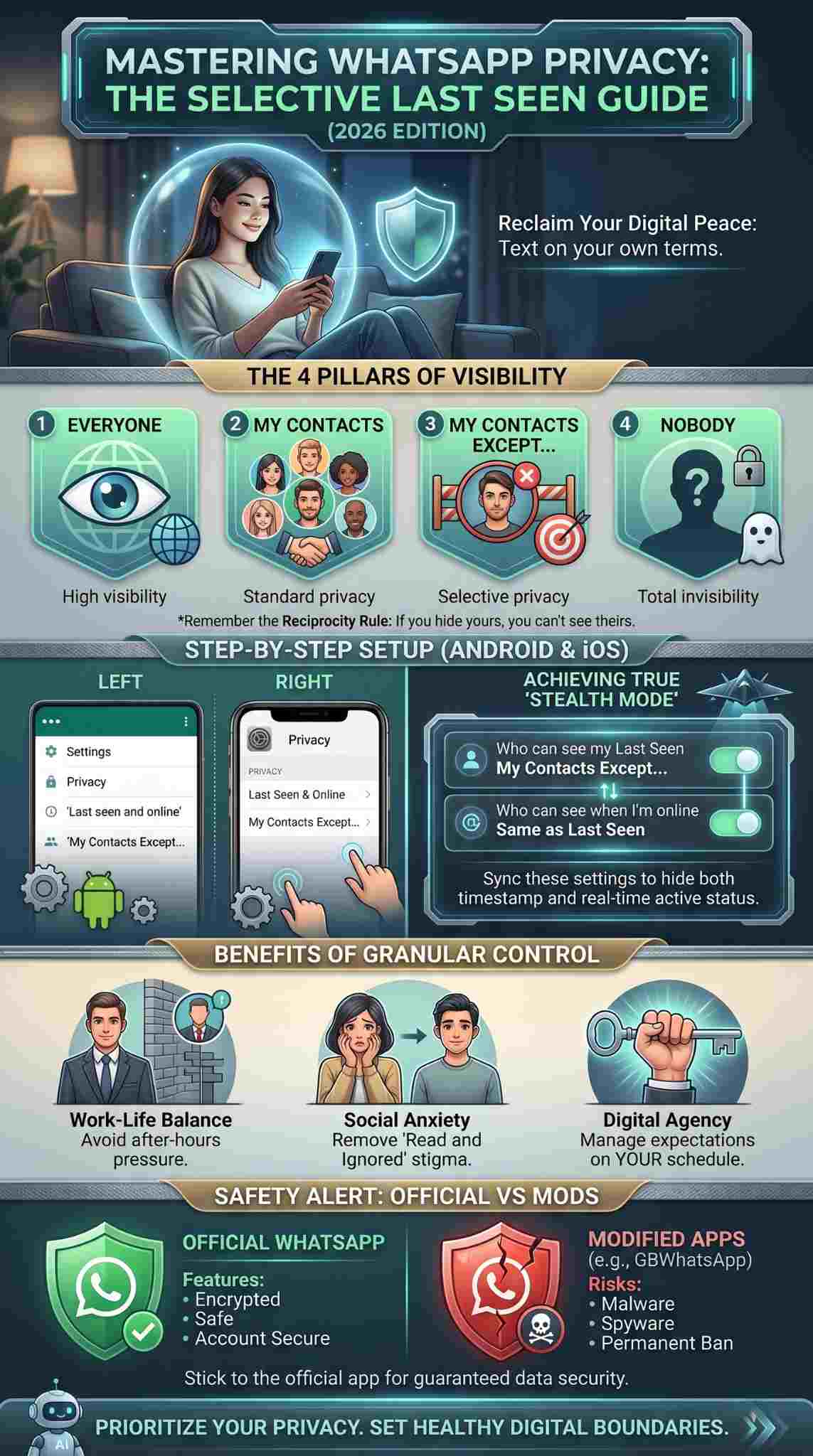
WhatsApp still follows a fair-play rule. If you don’t share your information with someone, you usually can’t see theirs either. It is a two-way street that keeps the platform balanced.
|
Aspect |
Old Way (Binary) |
New Way (Granular) |
|
User Control |
All or Nothing |
Person by Person |
|
Social Pressure |
High (always visible) |
Low (selective hiding) |
|
Flexibility |
Poor |
Excellent |
|
Privacy Tier |
Basic |
Advanced |
The Four Main Privacy Settings Explained
Before you start clicking buttons, you should know what each option actually does. WhatsApp organizes these into four distinct categories. Each one serves a different social strategy. Most people stick to “My Contacts,” but the “Except” option is where the real power lies for those who want to hide whatsapp last seen from specific eyes.
Everyone and My Contacts
The “Everyone” setting is the most open. It lets anyone with your number see your status. “My Contacts” limits this to people you actually know. This is a great baseline for most users who aren’t worried about privacy.
My Contacts Except and Nobody
The “Except” option is our focus today. It lets you blacklist specific people while keeping the door open for others. “Nobody” is the nuclear option where you disappear from everyone’s radar entirely.
|
Setting |
Who Sees You? |
Best For |
|
Everyone |
Literally anyone |
Public business accounts |
|
My Contacts |
Your saved list |
Standard personal use |
|
My Contacts Except… |
Everyone but selected |
Avoiding specific people |
|
Nobody |
No one |
Total digital detox |
How to Hide WhatsApp Last Seen Selectively
This is the core of the process. Whether you use an Android or an iPhone, the steps are built to be quick. The app has streamlined these menus over the last year to make them easier to find. To hide whatsapp last seen, you just need to dive into your account settings and pick your targets.
Steps for Android Users
Open the app and hit the three dots in the corner. Go to Settings, then Privacy. Tap on “Last seen and online” and pick “My Contacts Except…” Choose the people you want to block from seeing your status and hit the checkmark.
Steps for iPhone Users
On iOS, tap the Settings gear at the bottom. Go to Privacy, then “Last Seen & Online.” Select “My Contacts Except…” and check the names of the people you want to restrict. Tap “Done” to save your choices.
|
Device Type |
Navigation Path |
Final Action |
|
Android |
Settings > Privacy > Last Seen |
Green Checkmark |
|
iOS |
Settings > Privacy > Last Seen |
Done Button |
|
Web/Desktop |
Settings > Privacy |
Auto-syncs from phone |
Matching Your Online Status with Last Seen
Changing your “Last Seen” is only half the battle. If you stay “Online” while someone is looking at your chat, they will still know you are there. WhatsApp recently added a feature that lets you sync your online status with your last seen settings. This is how you achieve true “Stealth Mode” in 2026.
The “Same as Last Seen” Setting
In the same privacy menu, you will see a section for “Who can see when I’m online.” If you set this to “Same as Last Seen,” the people you blocked from seeing your timestamp also won’t see that you are currently active.
Read Also: How to Read WhatsApp Messages Without Sender Knowing
Why This Matters
Without syncing these two, someone could wait for you to appear “Online” even if they can’t see your last activity. Matching them ensures your privacy is airtight across the board.
|
Status Type |
What it Shows |
Why Sync It? |
|
Last Seen |
Past activity time |
Prevents history tracking |
|
Online |
Current activity |
Prevents real-time “catching” |
|
Synced |
Combined logic |
Maximum privacy |
Professional vs. Personal Boundaries
Many of us use one phone for everything. This means your boss, your mom, and your best friend are all in the same app. Selective hiding is a lifesaver for work-life balance. You can let your friends see you are up late without your manager wondering why you aren’t working on that project.
Managing the Office Crowd
You might want to appear professional during work hours. By excluding your colleagues from your status, you remove the pressure of being “always on.” It creates a digital wall that protects your personal time.
Family and Social Expectations
Sometimes, family members expect a reply the second they see you are online. Using selective privacy helps manage those expectations without causing a direct confrontation or an argument.
|
Boundary Type |
Targeted Group |
Desired Outcome |
|
Work |
Managers/Clients |
No after-hours pressure |
|
Family |
Overbearing relatives |
Reduced reply expectations |
|
Social |
Acquaintances |
General peace of mind |
Technical Troubleshooting and Common Errors
Sometimes settings don’t stick or things look weird. If you find that your “Last Seen” is still showing, it is usually a simple fix. Most issues come down to sync delays or network problems rather than an actual bug in the app.
Syncing Issues
If you change your settings on your phone but use WhatsApp Web, it might take a minute to update. Always make sure you have a stable data connection when you hit “Save.”
Why You Can’t See Others
Remember the reciprocity rule. If you hide your status from a specific person, you won’t be able to see theirs either. If you suddenly can’t see a friend’s status, check if you accidentally added them to your “Except” list.
|
Problem |
Likely Cause |
Quick Fix |
|
Settings not saving |
No internet connection |
Connect to Wi-Fi and retry |
|
Can’t see anyone |
Global “Nobody” set |
Change to “My Contacts” |
|
Status still visible |
App needs a restart |
Force close and reopen app |
The Dangers of Using Modified WhatsApp Versions
You might see ads for “WhatsApp Gold” or “GBWhatsApp” promising extra stealth features. Stay away from these. These apps are not official and can get your account banned for life. They also lack the end-to-end encryption that keeps your messages safe.
Security Risks
Third-party apps often have backdoors. They can steal your photos, messages, and contact lists. It is never worth risking your data for a few extra features that the official app will probably add anyway.
Official vs. Unofficial Features
The official app now lets you hide whatsapp last seen and your online status. There is no longer any real reason to use a modded version that puts your privacy at risk.
|
Feature |
Official App |
Modded App (Risk) |
|
Selective Hiding |
Yes |
Yes |
|
Encryption |
End-to-End |
Often Broken |
|
Account Safety |
Guaranteed |
High ban risk |
|
Data Privacy |
High |
Very Low |
The Psychology of Digital Presence
Why do we care so much about a timestamp? It is because “Last Seen” has become a social cue. In 2026, being “active” is often equated with being “available.” This isn’t always true. We might be checking a flight, looking at a shopping list, or reading a quick news update.
Presence Tension
This is the stress we feel when we know someone is watching us. By removing the timestamp for certain people, you are essentially reclaiming your right to be in a digital space without being “available” to everyone.
Reclaiming the “Right to Disconnect”
Hiding your status is a form of digital self-care. It allows you to engage with technology on your own terms. It turns the app back into a tool for you, rather than a tool for others to track you.
|
Psychological Factor |
Impact |
Solution |
|
Availability Bias |
People expect instant replies |
Hide last seen |
|
Monitoring Anxiety |
Feeling watched while active |
Sync online status |
|
Social Guilt |
Guilt over not replying |
Selective visibility |
Future Trends in App Privacy for 2026
As we look further into 2026, privacy is only going to get more advanced. We are already seeing rumors of “Ghost Mode” where you can read messages without triggering any indicators at all. AI is also helping by suggesting when you should go into “Do Not Disturb” mode based on your habits.
AI-Powered Privacy
Imagine an app that automatically hides your status when it detects you are at the gym or in a deep-focus work session. This is the direction we are heading. Privacy will become automated.
Enhanced Stealth Tools
We expect more features like “temporary invisibility,” where you can hide your status for just an hour or two with a single tap. This would make managing your digital presence even more effortless.
|
Trend |
Description |
Impact |
|
AI Focus |
Auto-privacy based on task |
Effortless boundaries |
|
Temporary Stealth |
One-tap timer for hiding |
Quick privacy bursts |
|
Contextual Status |
Status based on location |
Smarter visibility |
Final Thoughts
Taking control of your digital life doesn’t mean you are being rude. It means you are setting healthy boundaries. When you choose to hide whatsapp last seen for specific people, you are simply prioritizing your peace of mind. The tools are there—use them to make your messaging experience work for you, not against you. Stay safe, stay private, and enjoy your digital freedom.
Frequently Asked Questions
Can someone tell if I excluded them from my Last Seen?
There is no notification. The person will just see a blank space where your timestamp used to be. While they might guess you changed your settings, the app never explicitly tells them.
Does this setting affect my profile picture?
No. Your profile picture has its own separate privacy setting. You can choose to show it to everyone, just contacts, or no one, independent of your last seen status.
Can I hide my status for just one specific group of people?
Not exactly. You have to select individuals. However, the “My Contacts Except” list stays saved, so once you set it up, you don’t have to keep doing it.
If I am in a group chat, can they see me online?
If you have synced your “Online” status to your “Last Seen” and you have restricted those specific people, they will not see you as “Online” even if you are both in the same group.
Does this hide the “Blue Ticks”?
No. “Read Receipts” (the blue ticks) are a different setting. You can find that toggle in the same Privacy menu if you want to hide those as well.