
Deleting a TikTok video by mistake can feel awful, especially if the post had good views, comments, saves, or business value. The good news is that you may still be able to recover deleted TikTok video content if you act quickly and check the right places.
But here is the catch. Recovery depends on what exactly disappeared. A published TikTok post, a draft, a phone-saved video, and a cloud-backed-up clip are not the same thing. Each one has a different recovery path.
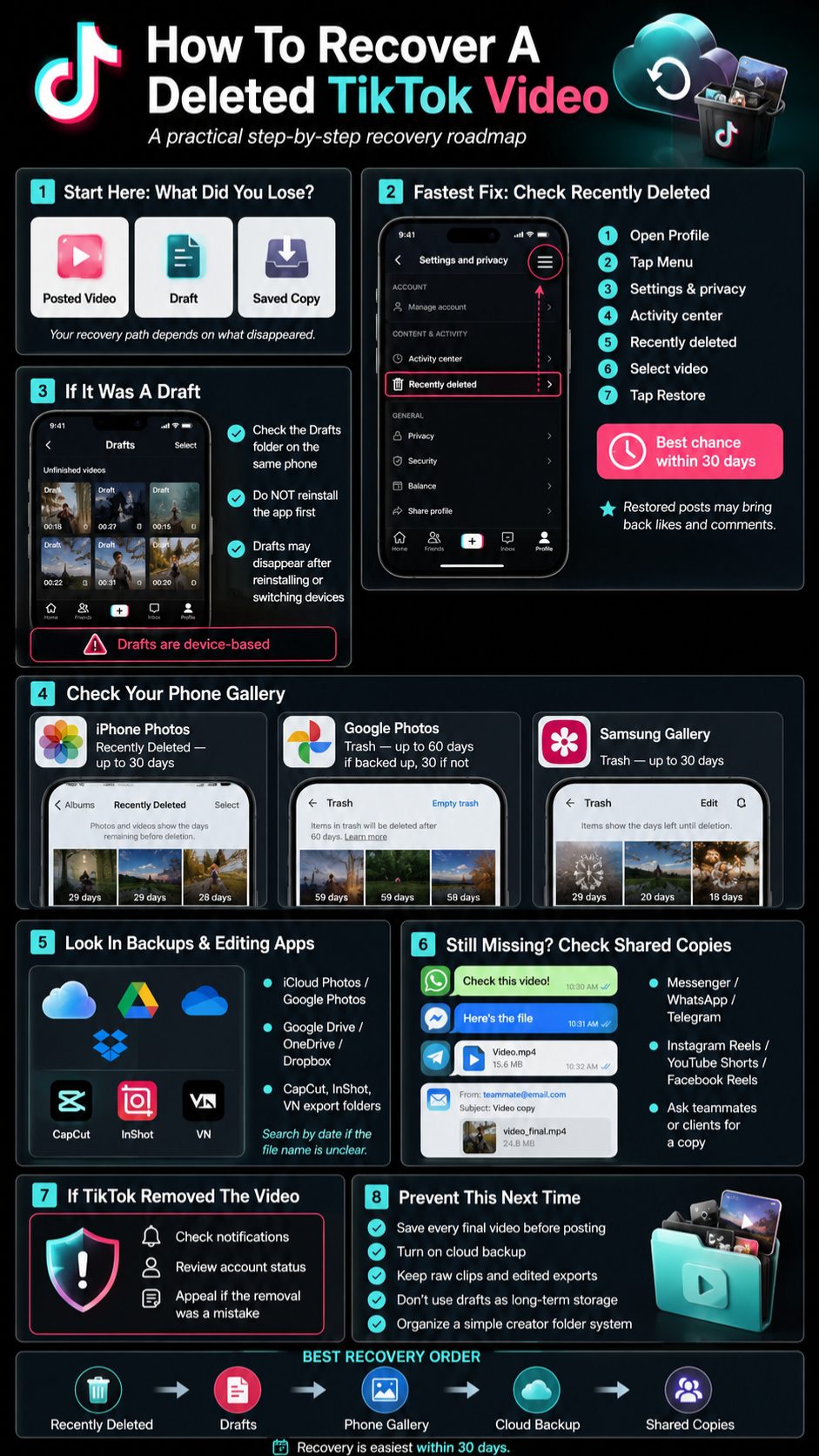
TikTok now offers a Recently Deleted section for posts deleted within the past 30 days. That makes recovery much easier than it used to be. But drafts are trickier because they are stored on your device, not safely backed up inside your account. TikTok says drafts may disappear if you uninstall and reinstall the app, or if you switch devices.
This guide walks you through every practical option, step by step. No fake “magic recovery” tricks. Just the real ways to check TikTok, your phone, cloud storage, and shared copies.
Can You Recover A Deleted TikTok Video?
Yes, you can recover a deleted TikTok video in some cases. The easiest case is when you deleted a published post less than 30 days ago. TikTok’s official Recently Deleted feature lets users restore deleted posts during that recovery window.
The situation changes if the video was a draft. TikTok drafts are not the same as published videos. They are saved on the device you used to create them, so they can vanish after reinstalling TikTok or changing phones.
If the TikTok video was also saved to your phone, your chances are better. iPhone, Google Photos, and Samsung Gallery all have recovery folders, but they also have time limits. Apple gives users 30 days to recover deleted photos or videos from Recently Deleted, while Google Photos keeps backed-up deleted videos in Trash for 60 days and non-backed-up videos for 30 days.
|
Situation |
Best Place To Check |
Recovery Chance |
|
Deleted published TikTok post |
TikTok Recently Deleted |
High within 30 days |
|
Deleted TikTok draft |
Drafts folder on same phone |
Medium |
|
Deleted video from phone |
Photos, Gallery, or Trash |
High if still within recovery period |
|
Deleted video after 30 days |
Cloud backup or shared copy |
Lower |
|
Video removed by TikTok |
Account notifications or appeal option |
Depends on reason |
What Recovery Really Means
Recovering a TikTok video can mean different things. Sometimes it means restoring the same post with its likes and comments. TikTok says restored posts can return to your profile with their associated likes and comments.
Other times, recovery simply means finding the original file and uploading it again. That is not the same as restoring the original post. You may get the video back, but not the views, comments, saves, or engagement.
What You Should Check First
Start with TikTok’s Recently Deleted folder if the video was already posted. Then check your Drafts folder if it was never published. After that, search your phone gallery, Google Photos, iCloud Photos, Samsung Gallery, Google Drive, OneDrive, and messaging apps.
This order matters because TikTok’s own recovery window is time-sensitive. The longer you wait, the more likely the video becomes permanently deleted from TikTok’s system.
Before You Try To Recover Deleted TikTok Video Content
Before tapping random buttons, slow down for a minute. Many people make recovery harder by deleting app data, clearing storage, reinstalling TikTok, or switching phones too quickly.
If your missing content was a draft, do not uninstall TikTok. TikTok states that drafts may be removed if the app is uninstalled and reinstalled. That single mistake can turn a recoverable draft into a lost file.
You should also avoid signing in from a new device and expecting drafts to appear there. TikTok says drafts may be removed if your account is moved or switched to another device.
|
What To Do First |
Why It Matters |
|
Check the same device |
Drafts are usually device-based |
|
Avoid reinstalling TikTok |
Reinstalling can remove drafts |
|
Check Recently Deleted quickly |
TikTok’s deleted post window is 30 days |
|
Search phone storage |
A saved copy may still exist |
|
Avoid shady recovery tools |
They may steal login data or fail |
Identify What Actually Disappeared
Ask yourself one simple question: was the video already posted?
If yes, go straight to TikTok’s Recently Deleted folder. If not, it may be a draft, and drafts need a different approach. If the video was saved to your camera roll, you may need your phone’s Photos, Gallery, or cloud backup instead.
Do Not Trust Every Recovery App
Many apps promise to recover deleted TikTok posts, but be careful. A third-party app cannot magically access TikTok’s private servers and restore a post that TikTok has permanently removed.
A recovery app may help only if it is scanning your phone storage, SD card, or computer backup. Even then, results are not guaranteed. Never share your TikTok password with a random recovery site.
Use The Same Account And Same Phone
Make sure you are logged into the same TikTok account where the video was posted or drafted. Also use the same phone where the draft was created.
This sounds obvious, but it causes many recovery failures. TikTok drafts are not a cloud folder that follows you everywhere. They are more like local working files saved inside the app on your device.
How To Recover Deleted TikTok Video From Recently Deleted
This is the most important method for most users. If your TikTok video was posted and then deleted within the past 30 days, TikTok’s Recently Deleted feature is the first place to check.
TikTok’s official instructions say users can go to Activity center, open Recently deleted, select the deleted post, and tap Restore. The restored post should reappear on the profile.
This method is useful because it can bring back the post itself, not just the raw video file. That means the restored post may keep its previous engagement instead of starting from zero.
|
Step |
Action |
|
1 |
Open the TikTok app |
|
2 |
Tap Profile |
|
3 |
Tap the Menu button |
|
4 |
Open Settings and privacy |
|
5 |
Go to Activity center |
|
6 |
Tap Recently deleted |
|
7 |
Select the deleted post |
|
8 |
Tap Restore |
Step-By-Step TikTok Recently Deleted Recovery
Open TikTok and tap Profile at the bottom of the screen. Then tap the Menu icon at the top and open Settings and privacy.
Next, select Activity center. Inside that section, tap Recently deleted. You should see posts that were deleted within the past 30 days. Choose the video you want to restore, then tap Restore.
After restoring it, return to your profile and refresh the page. The video should appear again on your profile if the recovery worked.
What Comes Back With The Restored Video?
TikTok says a recovered post will reappear on your profile. TikTok also says that comments and likes associated with the restored post are restored with it.
That matters a lot for creators. Reposting the same file from your phone may give you the video back, but it will not bring back the original comments, likes, shares, or ranking signals.
Why You May Not See Recently Deleted
If Recently Deleted is empty, the video may be older than 30 days, permanently removed, deleted from another account, or never posted in the first place. It may also have been a draft rather than a published post.
In that case, move to the next recovery options. The video might still be in your drafts, gallery, cloud backup, or a messaging app.
How To Recover Deleted TikTok Drafts
TikTok drafts are one of the most misunderstood parts of TikTok recovery. Many users think drafts are saved to their TikTok account like published videos. In reality, drafts are far more fragile.
TikTok says drafts are saved on the user’s device and may be removed if the app is uninstalled and reinstalled. TikTok also notes that drafts may be removed if an account is moved or switched to another device.
So, if your deleted TikTok video was actually a missing draft, your first job is to check the original phone before changing anything.
|
Draft Problem |
What To Try |
|
Draft still visible |
Open it and save it to device |
|
Draft missing after reinstall |
Recovery is unlikely from TikTok |
|
Draft missing after phone switch |
Check old phone first |
|
Draft edited but not posted |
Search phone gallery for saved copy |
|
Draft sent to someone |
Check messages or shared folders |
Check The Drafts Folder
Open TikTok, go to your Profile, and look for the Drafts folder in your video grid. If the draft is still there, open it immediately.
Before doing more edits, save a copy to your device if the app gives you that option. This protects you from losing the only version.
Read Also: How to Delete a TikTok Account Permanently in 2026
If The Draft Disappeared After Reinstalling TikTok
This is the tough part. If you deleted TikTok, cleared app data, reset your phone, or installed the app again, your drafts may be gone.
TikTok does not present drafts as a permanent cloud backup. So if the file was never saved to your phone or cloud storage, there may not be a reliable way to restore it from TikTok.
If You Switched Phones
Check the old phone first. If the draft was created there, it may still be stored inside the TikTok app on that device.
Do not delete TikTok from the old phone until you confirm whether the draft exists. If it is there, open the draft, save the video, or post it privately so you can access it later.
Recover Deleted TikTok Video From Your Phone Gallery
If TikTok recovery does not work, your next best option is your phone gallery. Many TikTok users save videos to their phone before posting, after editing, or while exporting a draft.
This is also useful if you want to recover deleted TikTok video files after the 30-day TikTok window has passed. You may not restore the original post, but you can still get the video file back.
For iPhone users, Apple says deleted photos and videos stay in the Recently Deleted album for 30 days. For Android users using Google Photos, backed-up videos remain in Trash for 60 days, while non-backed-up videos remain for 30 days.
|
Device Or App |
Recovery Folder |
Time Limit |
|
iPhone Photos |
Recently Deleted |
30 days |
|
iCloud Photos |
Recently Deleted |
30 days |
|
Google Photos |
Trash |
60 days if backed up |
|
Google Photos |
Trash |
30 days if not backed up |
|
Samsung Gallery |
Trash |
30 days |
For iPhone Users
Open the Photos app and check Recents, Videos, and Albums. Search by the date you created or posted the TikTok video.
Then scroll to Recently Deleted. If the video is there, select it and tap Recover. Apple says recovered photos and videos return to your Library.
For iCloud Photos
Go to iCloud Photos or check the Photos app on any Apple device connected to the same Apple Account. Open Recently Deleted and look for the missing video.
Apple’s iCloud support page says users can select deleted photos or videos from Recently Deleted and choose Recover.
For Android And Google Photos Users
Open Google Photos and search for TikTok, Videos, or the date you posted the clip. If you cannot find it, open Trash.
Google says items that are permanently deleted cannot be restored. So, if the video is in Trash, restore it before the time limit ends.
For Samsung Galaxy Users
Open Samsung Gallery, tap the Menu icon, and go to Trash. Select the video and restore it.
Samsung says deleted photos and videos stay in Gallery Trash for 30 days before permanent deletion.
Check Cloud Backups And File Storage Apps
Cloud backup is often the quiet hero in video recovery. You may not remember saving a TikTok video, but your phone may have backed it up automatically.
Check iCloud Photos, Google Photos, Samsung Cloud, Google Drive, OneDrive, Dropbox, and any file manager app you use. Also check folders like Camera, Movies, Downloads, TikTok, CapCut, VN, InShot, and Screen Recordings.
This step is especially useful for creators who edit videos outside TikTok before uploading. If you used CapCut or another editor, the exported version may still be in that app’s folder.
|
Backup Location |
What To Search |
|
iCloud Photos |
Date, video album, Recently Deleted |
|
Google Photos |
TikTok, video, date, Trash |
|
Google Drive |
MP4, TikTok, project name |
|
OneDrive |
Camera upload folder |
|
Dropbox |
Uploads or shared folders |
|
Editing apps |
Exports, drafts, projects |
Search By Date Instead Of File Name
TikTok videos often do not have friendly file names. Searching “TikTok” may help, but searching by date is usually better.
Think about when you recorded, edited, or posted the video. Then check that day and the few days around it in your cloud storage.
Check Video Editing App Exports
If you edited the video in CapCut, InShot, VN, Canva, Adobe Express, or another editing tool, open that app and check exported projects.
Many creators forget that the final TikTok upload was not created inside TikTok. It may have started as an exported MP4 from another app.
Check Computer And External Backups
If you transfer media to a laptop or desktop, check Downloads, Videos, Desktop, cloud sync folders, and external drives.
Creators who batch-produce content often have duplicate files without realizing it. Search for MP4, MOV, TikTok, Reel, Short, or the project topic.
Request Your TikTok Data
TikTok data download can be useful, but it should not be oversold. It is not a guaranteed way to recover a deleted video file.
TikTok says users can request their data by going to Profile, opening Settings and privacy, selecting Account, and choosing Download your data. TikTok says the file may include information such as username, watch history, comment history, and privacy settings.
Use this method when you need account records, activity details, or proof that content existed. But for restoring a deleted video, Recently Deleted, phone storage, and cloud backups are usually more useful.
|
TikTok Data Download Can Help With |
TikTok Data Download May Not Do |
|
Account activity |
Restore a permanently deleted post |
|
Comment history |
Bring back lost engagement |
|
Watch history |
Recover every deleted video file |
|
Privacy settings |
Replace phone or cloud backups |
How To Request Your TikTok Data
Open TikTok and go to Profile. Tap the Menu button, then open Settings and privacy.
Tap Account, then select Download your data. Choose the data type and file format, then submit the request.
When the file is ready, download it and review the available folders. Look for useful clues, but do not expect it to work like a video backup folder.
When This Method Is Worth Trying
This method is worth trying if the video was important for legal, brand, business, or account-history reasons. It may help you understand what happened around the time the video disappeared.
For simple recovery, though, start with TikTok’s Recently Deleted folder and your phone gallery first.
Sometimes the fastest recovery method is not TikTok at all. If you ever sent the video to someone, reposted it, or used it on another platform, a copy may still exist.
Check WhatsApp, Messenger, Telegram, Instagram DMs, email attachments, Google Drive links, and shared folders. Also check Instagram Reels, Facebook Reels, YouTube Shorts, Pinterest, Snapchat, and Threads.
This is especially helpful for businesses, creators, and social media teams. Someone on your team may still have the final video file saved.
|
Place To Check |
Why It Helps |
|
WhatsApp or Messenger |
You may have sent the video |
|
Instagram Reels |
Same video may be cross-posted |
|
YouTube Shorts |
Short-form reposts are common |
|
|
Clients or editors may have copies |
|
Google Drive |
Teams often share final files there |
|
Creator folders |
Raw and edited clips may be saved |
Ask Friends, Clients, Or Team Members
If the video was part of a campaign, ask anyone who reviewed, approved, or reposted it. They may have downloaded the clip before it was deleted.
Do not just ask, “Do you have the video?” Give them details. Mention the topic, date, caption, file name, or where they may have received it.
Check Your Other Social Accounts
Creators often reuse one vertical video across TikTok, Instagram Reels, Facebook Reels, YouTube Shorts, and Pinterest.
If the video is still live on another platform, download your own copy from that platform if allowed. Then store it properly before uploading it again.
Look For Screen Recordings
If you ever screen-recorded the TikTok to share feedback or check editing, that screen recording may still be in your phone.
Search your gallery for “Screen Recording” or check the date when the video was posted.
What If TikTok Removed The Video?
A video removed by TikTok is different from a video you deleted yourself. If TikTok removed the post because of a policy issue, it may not appear in Recently Deleted the same way a user-deleted post does.
In that case, check TikTok notifications, account status, and any message explaining the removal. If TikTok gives an appeal option, follow the in-app appeal process.
Do not repost the same video immediately without understanding the reason. If the video broke a rule, reposting it may create more account problems.
|
Problem |
What To Do |
|
You deleted the video |
Check Recently Deleted |
|
TikTok removed the video |
Check notifications and account status |
|
Video is under review |
Wait for TikTok’s review result |
|
Video broke a rule |
Edit or avoid reposting |
|
Removal seems wrong |
Use TikTok’s appeal option if available |
Deleted By You Vs Removed By TikTok
If you deleted the post manually, TikTok’s Recently Deleted folder is your best starting point.
If TikTok removed the post, look for a notification. The app may show whether the video violated a rule, was restricted, or is eligible for appeal.
Should You Reupload A Removed Video?
Not right away. First, understand why it was removed.
If the issue was music, safety, misinformation, copyrighted material, or another policy concern, reuploading the same file can repeat the same problem. Edit the content before trying again.
Can You Recover Deleted TikTok Video After 30 Days?
You may still recover the file after 30 days, but you probably cannot restore the original TikTok post from TikTok’s Recently Deleted folder. TikTok says Recently Deleted shows posts deleted within the past 30 days.
After that window, your best options are outside TikTok. Look for the video in your phone gallery, cloud backup, shared folders, editing apps, or other social platforms.
This is where good creator habits matter. If you saved the video before publishing, you have options. If the only copy existed inside TikTok, recovery becomes much harder.
|
After 30 Days, Check |
Why |
|
Phone gallery |
Saved copy may still exist |
|
iCloud Photos |
Apple backup may have the file |
|
Google Photos |
Backed-up Trash may keep files longer |
|
Samsung Gallery |
Trash may still help within 30 days |
|
Editing apps |
Exported versions may remain |
|
Other platforms |
Reposted copies may still be live |
Your Best Recovery Order After 30 Days
Start with your phone gallery and cloud backup. Then check editing apps and shared folders.
After that, check other platforms where you may have posted the same video. If the content was used for a client, campaign, or brand page, ask your team.
When Recovery Is Unlikely
Recovery is unlikely if the video was deleted from TikTok more than 30 days ago, was never saved to your phone, was not backed up, and was not shared anywhere else.
That is frustrating, but it is better to be honest than waste time on fake tools that promise impossible results.
How To Prevent Losing TikTok Videos Again
The best recovery plan is not needing recovery at all. If you create TikTok content often, you need a simple backup system.
TikTok has more than 1 billion monthly users globally, according to TikTok’s own newsroom announcement. For creators and publishers, that means short-form videos are no longer casual files. They are content assets.
Every TikTok video should exist in at least two places: your phone or computer, and a cloud backup. If the video is important, keep the raw clips too.
|
Prevention Habit |
Benefit |
|
Save before posting |
Keeps a clean backup |
|
Use cloud backup |
Protects against phone loss |
|
Keep raw clips |
Helps with re-editing |
|
Organize folders |
Makes old videos easier to find |
|
Avoid long-term draft storage |
Reduces draft-loss risk |
Save Every Final Video Outside TikTok
Before posting, save the finished video to your device. Then upload it to TikTok.
This gives you a clean copy if the post is deleted, restricted, or needs to be uploaded somewhere else later.
Create A Simple Folder System
Use folders like Raw Clips, Edited Videos, Posted TikToks, Client Videos, Captions, and Thumbnails.
You do not need a complicated system. You just need something you can search quickly when a video goes missing.
Do Not Use Drafts As Permanent Storage
Drafts are useful for unfinished work, but they are not a safe archive. Since TikTok drafts can disappear after reinstalling the app or switching devices, creators should not treat them as long-term storage.
If a draft matters, save it, post it privately, or export it before changing phones or clearing app storage.
Final Thoughts
If you want to recover deleted TikTok video content, start with the method that matches your situation. For a deleted published post, check TikTok’s Recently Deleted folder first. That is the cleanest recovery path, especially within the 30-day window.
For drafts, use the same phone where the draft was created and avoid reinstalling TikTok. For saved videos, check your phone gallery, iCloud, Google Photos, Samsung Gallery, and other cloud storage apps. If none of those work, search shared messages, editing apps, and other platforms where you may have posted the same clip.
The safest habit is simple: never let TikTok hold your only copy. Save every final video outside the app, back it up, and organize your creator files. That way, the next accidental delete becomes annoying, not disastrous.
Uncommon FAQs About Recover Deleted TikTok Video
|
Question Type |
Why Users Ask |
|
Draft recovery |
Drafts disappear often after app changes |
|
Engagement recovery |
Creators want likes and comments back |
|
Data download |
Users think it may include videos |
|
Cross-device recovery |
Drafts do not always move to new phones |
|
Third-party tools |
Many recovery apps make big claims |
Can I Recover A Deleted TikTok Video Without Recently Deleted?
Yes, but only if another copy exists. Check your phone gallery, cloud backup, editing apps, downloads folder, messages, and other social media platforms.
If TikTok’s Recently Deleted folder is empty and you have no saved copy, recovery becomes much harder.
Will Restoring A TikTok Video Bring Back Likes And Comments?
If you restore the post through TikTok’s Recently Deleted feature, TikTok says the associated comments and likes are restored with it.
If you upload the same video again from your phone, it becomes a new post. The old engagement will not come back.
Can I Recover Deleted TikTok Drafts From Another Phone?
Usually, no. TikTok says drafts may be removed when an account is moved or switched to another device.
Check the original phone where the draft was created. If it still appears there, save it before making any changes.
Can TikTok Support Recover My Permanently Deleted Video?
There is no reliable public promise that TikTok Support can restore permanently deleted videos after the Recently Deleted window. Your best options are TikTok’s Recently Deleted section, your phone, backups, and shared copies.
You can still contact support for account-specific issues, but do not depend on it as your main recovery method.
Does TikTok Data Download Include Deleted Videos?
TikTok data download may include account and activity information, but it should not be treated as a guaranteed deleted-video backup. TikTok says downloadable data may include details such as username, watch history, comment history, and privacy settings.
Use it for account records, not as your first recovery tool.
Can I Recover A TikTok Video If I Deleted It From My Camera Roll Too?
Maybe. Check Recently Deleted on iPhone, Trash in Google Photos, or Trash in Samsung Gallery.
Apple gives users 30 days to recover deleted photos and videos, Google Photos keeps backed-up deleted videos in Trash for 60 days, and Samsung Gallery keeps deleted items in Trash for 30 days.
Can I Recover Someone Else’s Deleted TikTok Video?
Usually, no. If another creator deleted their own video, you cannot restore it from their account.
You may only have access if you saved it earlier, received it in a message, or the creator reposted it somewhere else.
Should I Use A TikTok Recovery Website?
Be careful. Do not enter your TikTok password into any random recovery website.
A real recovery method should not need your password unless it is TikTok’s own app or official website. For local file recovery, use trusted phone, computer, or cloud tools only.