
Finding out someone broke into your professional networking profile is terrifying. You spend years building connections, endorsing colleagues, and creating a digital resume, only to have a stranger take control in seconds. A hijacked profile can damage your reputation by spamming your boss, confusing your clients, and putting your personal data up for sale. The good news is that taking control back is entirely possible if you act fast.
If you need to recover hacked linkedin account access right now, this guide will walk you through the exact steps to kick out the attacker and lock your profile down for good.
Understanding Why LinkedIn Accounts Get Hacked
Cybercriminals do not just target bank accounts anymore. They actively hunt for professional profiles because they hold immense value in the underground market. An established profile with hundreds of connections looks highly trustworthy to other users. Scammers hijack these accounts to message your network with fake job offers, phishing links, or cryptocurrency scams. They also scrape your private data, including your phone number and email address, to use in targeted attacks elsewhere. Understanding how they get in helps you shut the door permanently.
|
Threat Vector |
Description |
Common Target |
|
Phishing Emails |
Fake alerts tricking you into typing your password. |
Corporate email addresses |
|
Password Reuse |
Hackers use credentials leaked from other sites. |
Users with one master password |
|
Rogue Apps |
Sketchy third-party tools requesting full profile access. |
People using automation bots |
Common Phishing Tactics
Phishing is still the easiest way for someone to steal your login details. You might get an email that perfectly mimics a real platform alert. It usually claims your profile will be permanently deleted or restricted if you do not log in immediately to verify your identity. The email contains a link pointing to a fake website that looks identical to the real login screen. The moment you type your username and password into that fake site, the attackers instantly grab your credentials and log into your real profile.
Weak Passwords and Data Breaches
People hate memorizing passwords, so they often use the exact same one for their email, their favorite online store, and their professional networks. If a random forum you joined five years ago gets breached, hackers buy that list of emails and passwords on the dark web. They then run automated software to test those exact combinations across every major social platform. If you reuse passwords, a breach on an entirely unrelated website can directly lead to a compromised professional profile.
Many users connect outside apps to their profiles to schedule posts, scrape lead data, or send hundreds of automated connection requests. While these tools sound great for productivity, they often require you to hand over your login tokens. If the company making that app has poor security, hackers can break into their servers and steal your token. This gives them a direct backdoor into your profile without ever needing to know your actual password.
Immediate Steps to Take When You Suspect a Hack
Time is your biggest enemy when dealing with a compromised profile. The longer an attacker has free reign, the more damage they can do to your professional relationships. Hackers usually try to change your primary email address and phone number immediately so they can lock you out permanently. The moment you see strange messages in your outbox or get an alert about a new login from a foreign country, you have to drop everything and secure your base. Taking these steps before you officially try to recover hacked linkedin account access can save you days of headaches.
|
Immediate Action |
Purpose |
Priority Level |
|
Secure Primary Email |
Prevents the hacker from intercepting reset links. |
Critical |
|
Force Logouts |
Kicks the attacker out of the active session. |
High |
|
Change Password |
Locks the door if you still have access. |
High |
Check Your Linked Email and Phone Number
Your first move should always be checking your email inbox. Search for any security alerts regarding new logins, password changes, or requests to add a new email address. If the attacker compromised your actual email inbox first, you must fix that before touching your networking profile. Change your email password right away and turn on two-step verification for your inbox. If the hacker controls your email, they will just intercept any password reset links you try to send yourself.
Read Also: How to See Who Viewed Your LinkedIn Profile Anonymously
If your password still works and you are logged in, navigate straight to your account settings. Go to the privacy and security area and look for the section detailing where you are signed in. This shows every phone, tablet, and computer currently connected to your profile, along with their rough geographical locations. If you live in London but see an active session from a server in Eastern Europe, that is the hacker. You can click to end that specific session immediately, which abruptly kicks them out of your profile.
How to Recover Hacked LinkedIn Account Step by Step
The exact road you take to get your profile back depends on how fast you caught the intrusion. Sometimes you catch them while they are just snooping around, and other times you wake up to find your entire digital identity locked behind a changed password. We broke this process down into three specific scenarios. Find the one that matches your current situation and follow the steps exactly.
|
Scenario Type |
Current Access Level |
Required Action |
|
Scenario 1 |
Can still log in normally |
Change password and force logouts |
|
Scenario 2 |
Password changed, email intact |
Use standard password reset tool |
|
Scenario 3 |
Locked out completely |
Submit government ID verification |
Scenario 1 You Still Have Access to Your Account
Sometimes attackers buy stolen credentials but do not change the password right away. They might just want to silently scrape your data or send spam over a long period. If your current password still gets you in, you have a massive advantage.
Navigate to your security settings and find the option to change your password. You need to pick something completely new and incredibly long. Avoid using your company name, your pet’s name, or anything someone could guess by looking at your public data. Once you update the password, stay in the settings menu and navigate to two-step verification. Turn this on immediately. This forces anyone logging in to provide a temporary code from your phone, stopping hackers dead in their tracks even if they somehow guess your new password.
Scenario 2 You Cannot Access Your Account but Have Access to Email
If you type your password and get an error, the hacker likely changed it. However, changing the primary email address on an account usually requires passing a few security checks, which slows attackers down. If they haven’t removed your email yet, you can fix this quickly.
Go to the main login page and click the link that says you forgot your password. Type in the email address you have always used for the platform. The system will fire off a six-digit code to your inbox. Grab that code, type it into the verification screen, and the system will let you create a new password. The moment you save the new password, the platform will automatically invalidate the hacker’s active session and lock them out.
Scenario 3 The Hacker Changed Your Email and Password
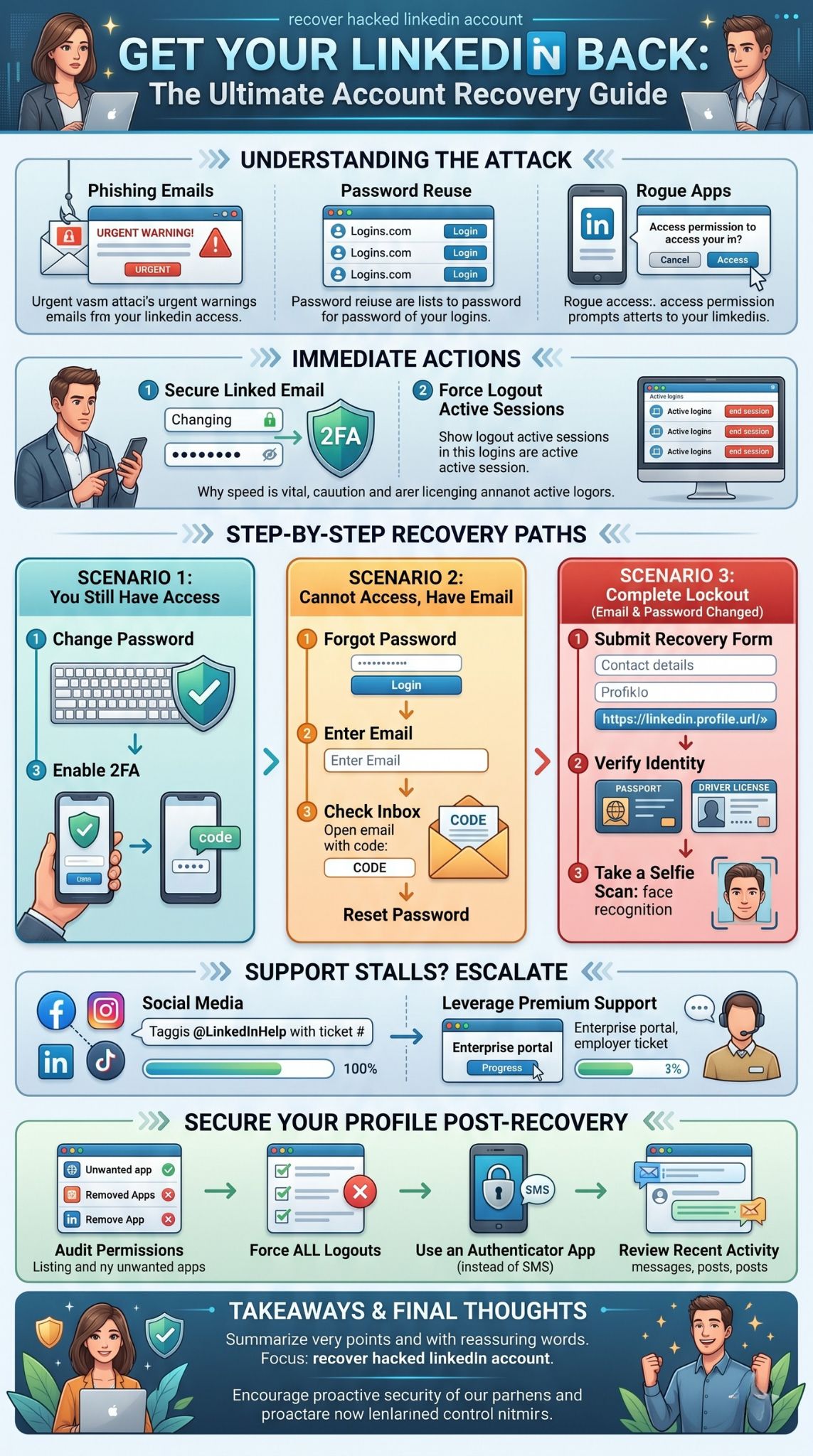
This is the nightmare scenario. You try to log in, and your password fails. You try to reset it, and the system says your email is not found, or worse, it sends the reset link to an email address the hacker controls. You are totally locked out.
To fix this, you must bypass the automated login screen and prove to human support agents that you are the real person in the profile picture. Go to the platform’s help center and search for the compromised account reporting form. You will need to provide the public URL of your profile, your original email address, and a clear explanation that your details were changed maliciously.
The support team will reply asking you to verify your identity through a secure partner service called Jumio. You will receive a secure link on your smartphone to take a photo of your government-issued ID. A driver’s license or passport works best. Make sure you are in a well-lit room, place the ID on a dark, flat surface, and ensure there is no glare blocking the text. You will also have to take a live selfie. The system matches your live face to the ID photo, and then matches the ID name to your profile. Once approved, support will manually strip the hacker’s email from the account and send you a secure link to log back in.
What to Do If Support Does Not Respond
The automated recovery systems work well when everything aligns perfectly, but sometimes things break. You might submit your ID scan and hear absolutely nothing for a week. The customer support queue is massive, and complex hacking cases often get stuck in a backlog. Sitting around and waiting is stressful, especially when your profile is being used to scam your connections. If you want to speed up the timeline to recover hacked linkedin account access, you need to make some noise through alternative channels.
|
Escalation Method |
Best Used When |
Expected Response Time |
|
Twitter / X Support |
Normal tickets go unanswered for days. |
24 to 48 hours |
|
Corporate Portal |
You work for a company with premium tools. |
12 to 24 hours |
|
BBB Complaints |
All other methods completely fail. |
3 to 5 days |
Reach Out via Social Media
Customer service teams care deeply about their public image. If you are stuck in an automated email loop, take your complaint to social media. Create a post on X and tag their official help handle. Keep it highly factual. State that your profile was compromised, you submitted your identity verification on a specific date, and you have the ticket number ready. Do not post your email address or phone number publicly. Usually, a social media manager will ask you to send them a direct message with your ticket number. They can often flag your case internally and force a human to look at your uploaded ID scan.
Leverage Premium or Corporate Support
If your company pays for enterprise tools like Sales Navigator or Recruiter, you are technically a high-value customer. Reach out to the person at your job who manages these licenses, usually someone in HR or IT. They have access to a dedicated enterprise support portal that bypasses the free-user queue. Ask them to open a support ticket on your behalf, explaining that one of their licensed users has been locked out by a hacker. Enterprise support agents respond much faster and have the authority to resolve identity verification issues quickly.
How to Secure Your Profile After Recovery
Getting your profile back is a huge relief, but your work is not finished yet. When hackers take over, they leave traps behind. They might have authorized a hidden app to maintain access, or they might have linked a secondary email address you do not recognize. If you just log in and go back to normal, they will likely break back in tomorrow. Once you finally recover hacked linkedin account control, you have to do a deep clean of your settings to ensure the intruder is permanently locked out.
|
Security Measure |
How to Implement |
Benefit |
|
Audit Connected Apps |
Settings > Data Privacy > Permitted Services |
Removes hidden backdoors. |
|
Enable Authenticator |
Settings > Security > Two-Step Verification |
Stops password-guessing attacks. |
|
Review Recent Activity |
Check messages and recent posts. |
Cleans up reputational damage. |
Audit Connected Apps and Sessions
The moment you regain access, ignore your notifications and go straight to your settings. Check the section for emails and phone numbers. Delete anything that does not belong to you. Next, navigate to the data privacy section and look at your permitted services and third-party apps. If you see resume builders, scheduling tools, or browser extensions you do not actively use, revoke their access immediately. Finally, check your active login sessions one more time and force a logout on every device except the computer you are currently typing on.
Set Up a Phishing Resistant Login Method
Relying on just a password is a terrible idea. You need to upgrade your security immediately. Go into your security settings and turn on two-step verification, but do not use text messages. SMS codes can be stolen by hackers using SIM-swapping techniques. Instead, choose the authenticator app option. Download an app like Google Authenticator or Authy on your phone, scan the QR code on your screen, and link them up. This generates a new code every thirty seconds that never travels over a cell tower.
Regularly Review Account Activity
Now you need to do damage control. Check your outbox to see if the hacker messaged anyone. If they sent spam links to your boss or your clients, you need to send a follow-up message explaining that your profile was temporarily compromised and advising them not to click any links. Check your recent posts and delete any weird articles or cryptocurrency promotions. Finally, look at your pending connection requests and withdraw any that the hacker sent out. Doing this cleanup protects your network and restores your professional image.
Final Thoughts
Losing control of your digital resume is an incredibly stressful ordeal, but panicking will only slow you down. The most important thing is to act methodically. Secure your primary email first, kick out any active rogue sessions, and immediately start the verification process if your password no longer works. Remember that patience is necessary when dealing with automated support desks, but polite persistence on social media can help speed things up. By following these strict security protocols and setting up an authenticator app, you can recover hacked linkedin account control and ensure no cybercriminal ever messes with your professional reputation again.
Uncommon FAQs
Can a hacker read my private direct messages?
Yes. If an attacker gains full access to your profile, they can read your entire message history, download your attachments, and view contact information for your connections. This is why securing your profile quickly is vital to protect your network’s privacy.
Will my connections be notified that I was hacked?
The platform does not automatically announce that a profile was compromised. You have to manually inform your network if you believe the hacker sent them malicious links or inappropriate messages during the time they had control.
Can I get my account back if I do not have a government ID?
It is very difficult, but possible. You can sometimes use a notarized Affidavit of Identity, where a legal official verifies who you are, or use a corporate email address if it perfectly matches the current employer listed on your public resume.
What happens if the hacker deletes my account entirely?
If the attacker triggers a deletion, the platform usually holds the data for roughly fourteen days before wiping it completely from their servers. If you contact support within that short window, they can halt the deletion and restore your data.
Why is the identity verification link giving me an error?
The secure Jumio links usually expire quickly for security reasons. If you wait too long to click the link on your phone, it will fail. You must reply to the original support email and ask them to generate a fresh verification link.