
You posted a TikTok. The views started climbing. Then the share count jumped.
Now you’re wondering one thing: can you see who shared tiktok videos, or does TikTok only show the number?
Here’s the straight answer.
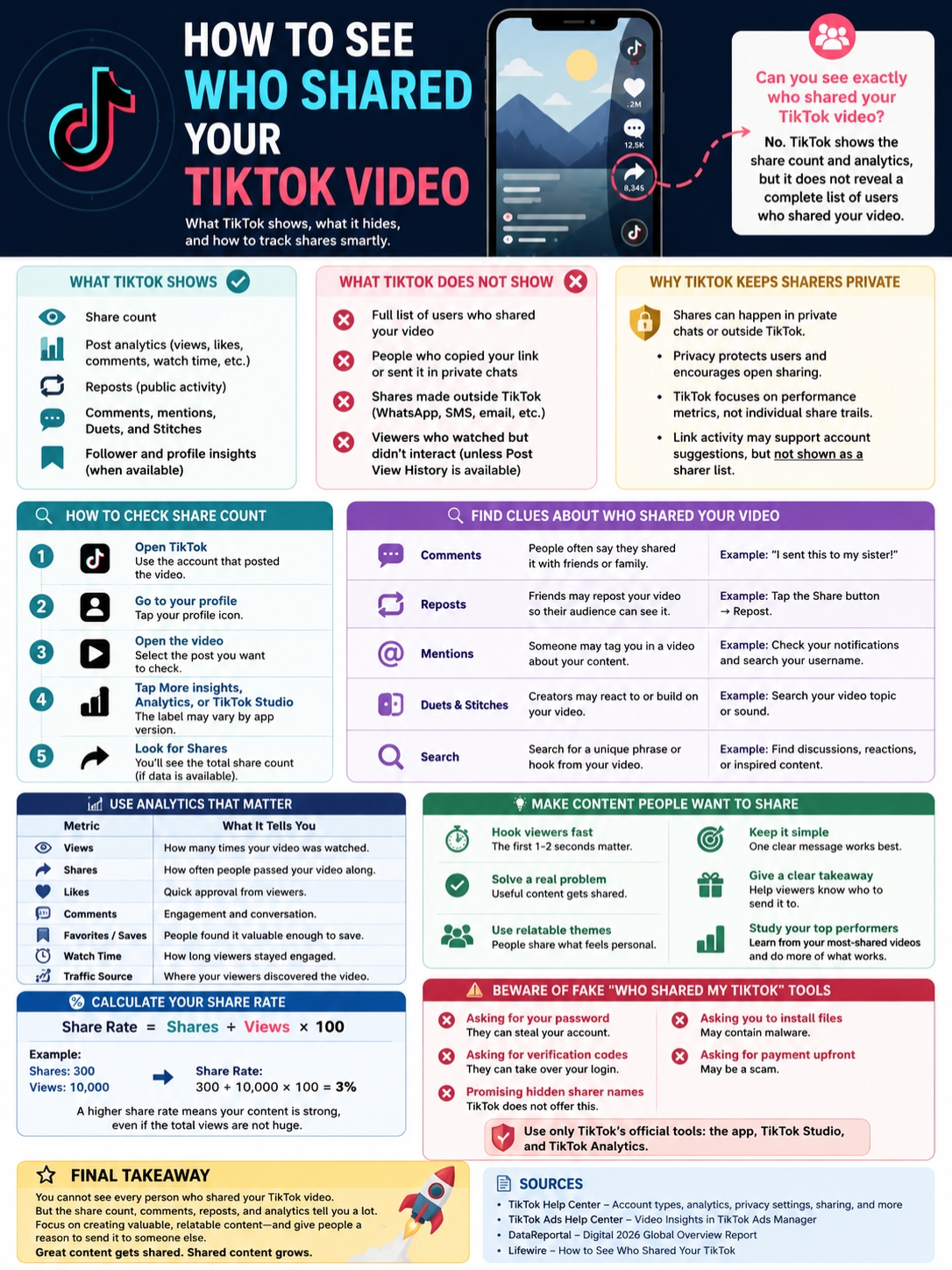
TikTok does not show a full list of people who shared your video. You can see how many times your video was shared. You can also check clues from comments, reposts, mentions, Duets, Stitches, and TikTok analytics. But TikTok does not give creators a complete “these users shared your video” list.
That can feel annoying, especially when one share can push a video into a new crowd. Still, the share count tells you a lot. It shows that someone did more than scroll past. They thought your video was funny, useful, relatable, or worth sending to another person.
And on TikTok, that matters.
TikTok remains one of the biggest social platforms in the world. DataReportal’s Digital 2026 Global Overview Report listed TikTok among the top social platforms by monthly use and active mobile app users. That means a single video can move fast when people start sharing it.
So, no, you can’t see every sharer’s name. But you can learn what TikTok shows, what it hides, and how to use your share data in a smart way.
|
Question |
Clear Answer |
|
Can you see every person who shared your TikTok? |
No. TikTok does not show a complete sharer list. |
|
Can you see how many times your video was shared? |
Yes. You can check the share count. |
|
Can TikTok Studio show share data? |
Yes. It can show post performance insights. |
|
Can a Business Account see exact sharers? |
No. Business tools do not reveal private sharer names. |
|
Can third-party apps reveal hidden sharers? |
No trusted tool can safely do this. |
The short answer is no. TikTok does not let you see every person who shared your video.
What it does show is the share count. That number tells you how many times people used TikTok’s share options. This may include sending the video to someone, copying the link, reposting it, or sharing it through another app.
TikTok’s analytics tools are built for performance tracking. They help creators understand views, likes, comments, shares, followers, watch time, and other useful signals. TikTok says both Personal Accounts and Business Accounts can access analytics, but you need at least one public post.
That’s important.
Analytics can tell you how your video performed. They can’t tell you every private action behind the scenes.
A like is usually visible. A comment is visible. A public Duet or Stitch may be visible. But if someone shares your video in a private message, copies the link, or sends it in a WhatsApp group, TikTok does not hand you that person’s name.
That’s why so many articles on this topic sound confusing. Some say you can “see who shared TikTok,” but they usually mean you can see how many times the video was shared. That is not the same thing as seeing every sharer.
|
Step |
What to Do |
What You’ll Find |
|
1 |
Open TikTok |
Use the account that posted the video. |
|
2 |
Go to your profile |
Tap your profile icon. |
|
3 |
Open the video |
Pick the video you want to check. |
|
4 |
Tap More insights, Analytics, or TikTok Studio |
The label may vary. |
|
5 |
Look for Shares |
This shows the total share count. |
You can check your share count in a few ways. The exact menu may look a little different depending on your app version, country, account type, and TikTok updates.
Check From the Video Page
Start with the video itself.
Open TikTok, go to your profile, and tap the video you want to review. Look for the share icon. It usually looks like an arrow. In some cases, TikTok shows the share count beside that icon.
If you don’t see the number there, tap More insights or open the video’s analytics panel.
TikTok may use different labels, such as:
- More insights
- Post analytics
- Analytics
- Creator tools
- TikTok Studio
The names may change, but the goal is the same. You’re looking for the performance data for that video.
Check From TikTok Studio
TikTok Studio is now one of the main places for creator tools.
To check your video shares from TikTok Studio:
- Open TikTok.
- Tap Profile.
- Tap the menu icon.
- Open TikTok Studio or Creator tools.
- Go to Analytics.
- Select the video.
- Look for Shares under engagement or post performance.
TikTok says Studio helps creators manage content, check performance, and understand their account growth. It is useful if you post often or want to compare videos.
The share number may not update instantly. If your video is new, give it some time and check again later.
|
Public Clue |
What It Can Tell You |
What It Cannot Tell You |
|
Comments |
People may say they shared it. |
It will not reveal silent sharers. |
|
Reposts |
Someone may have pushed your video to others. |
It is not a full share list. |
|
Mentions |
Someone may tag you in a related post. |
Many shares happen without tags. |
|
Duets |
A creator may react to your video. |
It does not show private shares. |
|
Stitches |
Someone may quote part of your video. |
It only shows public reuse. |
You can’t see every private share. But you can still pick up useful clues.
Start with your notifications. Look for comments, reposts, mentions, Duets, and Stitches. These actions can show who interacted with your video in a public way.
Read the Comments Carefully
Comments often tell you why a video is spreading.
You may see lines like:
- “I sent this to my sister.”
- “My group chat needed this.”
- “Reposting because this is true.”
- “I shared this with my team.”
- “This is exactly my friend.”
These comments do not give you a complete sharer list. But they do tell you something useful. They show what made people share the video.
That’s valuable for creators.
If people keep saying they sent your video to a friend, your content probably feels relatable. If they say they shared it with coworkers, your video may hit a work-related pain point. If they say “my group chat needs this,” your video has social energy.
That’s the kind of insight you can use.
Check Reposts
Reposts can also give you clues.
TikTok lets users repost videos so their friends or followers may see them. A repost is one form of sharing, but it does not cover every type of share.
A TikTok share can happen in several ways:
- Someone sends your video through TikTok messages.
- Someone copies the video link.
- Someone shares it on WhatsApp, Messenger, Instagram, Facebook, or another app.
- Someone reposts it on TikTok.
- Someone sends it in a group chat.
Only some of these actions leave visible signs.
So if you want to see who shared tiktok content, reposts may help a little. But they won’t show the full picture.
Search Your Username or Video Hook
If a video starts moving fast, search for your username inside TikTok. You can also search a unique phrase from your video.
This works best when your video has a strong hook or memorable line.
For example, a caption like “Watch this” will be hard to track. But a line like “Stop making this TikTok mistake” is easier to find if others discuss it.
Read Also: How to Go Live on TikTok Without 1,000 Followers in 2026
You may discover:
- Duets
- Stitches
- Reaction videos
- Mentions
- Public repost discussions
- Videos inspired by your post
Again, this is not the same as seeing all sharers. But it can help you understand where your video is going.
|
Reason |
What It Means |
|
Privacy |
People often share videos in private spaces. |
|
External sharing |
A link can move outside TikTok fast. |
|
User trust |
People may share less if every share exposes their name. |
|
Platform design |
TikTok focuses on performance data, not private share trails. |
|
Link activity |
TikTok may use some link signals, but not as a public sharer list. |
TikTok sharing is not limited to TikTok.
Someone can tap share and send your video to a friend. Someone else can copy the link and paste it into a WhatsApp group. Another person can send it through text, email, Messenger, Discord, Slack, or Instagram.
Once a TikTok link moves outside the app, the trail becomes private.
That is one big reason TikTok does not show a full list of sharers. It would also create a privacy problem. People share videos for many reasons. Sometimes it is praise. Sometimes it is a joke. Sometimes it is a private conversation. Sometimes it is criticism.
If TikTok exposed every sharer, people might stop sharing as freely.
TikTok does use account and interaction signals in different ways. For example, its account suggestion settings may consider link-related activity in some cases. But that does not mean creators get a list of everyone who shared their videos.
So the real answer stays the same: TikTok may count shares, but it does not reveal every sharer’s identity.
What TikTok Analytics Can Tell You Instead
|
Metric |
What It Shows |
Why It Matters |
|
Views |
How many times people watched the video |
Shows reach |
|
Shares |
How often people shared it |
Shows pass-along value |
|
Likes |
How many people liked it |
Shows quick approval |
|
Comments |
How many people replied |
Shows discussion |
|
Favorites or saves |
How many people saved it |
Shows long-term value |
|
Watch time |
How long people stayed |
Shows content strength |
|
Traffic source |
Where viewers came from |
Shows discovery path |
If you’re trying to grow, analytics may help more than a sharer list.
A share count tells you that people took action. They didn’t just watch. They sent the video somewhere, saved it for a conversation, or pushed it to another audience.
TikTok’s recommendation system looks at user interactions. TikTok says interactions can include likes, shares, comments, watch behavior, and other signals. So shares matter because they show strong interest.
A big share number looks nice. But it does not tell the whole story.
You need to compare shares with views.
Use this simple formula:
Share rate = shares ÷ views × 100
Here’s an example:
- Views: 10,000
- Shares: 300
- Share rate: 3%
That means 3 out of every 100 viewers shared the video.
Now compare that with this:
- Views: 1,000,000
- Shares: 500
- Share rate: 0.05%
The second video has more total shares, but the first one has a much stronger share rate.
That’s why share rate matters. It shows how powerful the video was for the people who actually saw it.
Compare Similar Videos
Don’t compare every post against every other post. That can confuse you.
Compare videos with the same format.
For example:
- Tutorial vs tutorial
- Product review vs product review
- Funny skit vs funny skit
- News explainer vs news explainer
- Personal story vs personal story
This gives you a cleaner read.
A funny dating video and a phone settings tutorial do not spread for the same reason. One may get shared because it feels relatable. The other may get shared because it solves a problem.
Both are useful. But they need different content strategies.
|
Problem |
Likely Reason |
What to Try |
|
Analytics are missing |
You may not have a public post yet. |
Publish at least one public video. |
|
Share count is not showing |
Data may be delayed. |
Wait and refresh later. |
|
TikTok Studio is missing |
App version, age, region, or account issue. |
Update TikTok and check again. |
|
Video has no share number |
The post may have no shares yet. |
Check another video. |
|
Reach is limited |
Your account or video may be private. |
Review your privacy settings. |
Sometimes the share data is not easy to find.
That does not always mean TikTok removed it. The app changes often. A button may move. A label may change. A feature may appear under TikTok Studio instead of Creator tools.
Try These Fixes
If you can’t find share data, try this:
- Update the TikTok app.
- Close and reopen the app.
- Check from your phone, not only desktop.
- Open TikTok Studio.
- Make sure the video is public.
- Wait a few hours if the video is new.
- Check another video with more engagement.
- Review your account privacy settings.
TikTok says analytics need at least one public post. If your account is private or your post has limited visibility, your reach and data may also be limited.
Post privacy matters too. TikTok lets creators control who can view each post. A video set to a smaller audience will naturally have fewer views and fewer shares.
|
Feature |
What It Shows |
What It Does Not Show |
|
Post View History |
Some people who viewed your posts |
Who shared the post |
|
Profile View History |
Some people who visited your profile |
Who shared your video |
|
Analytics |
Views, shares, and performance data |
Full sharer names |
|
Reposts |
Some repost activity |
Every private share |
This is a common mix-up.
Post View History is about views. It is not about shares.
If the feature is available on your account, it may help you see some people who viewed your posts, depending on TikTok’s rules and privacy settings. But it still does not tell you who shared your video.
A viewer and a sharer are not the same thing.
Someone may watch your video and never share it. Someone else may share your video through a private chat and never comment. TikTok treats those actions differently.
So if your goal is to see who shared tiktok videos, Post View History will not solve it.
|
Red Flag |
Why It’s Risky |
|
It asks for your TikTok password |
It may steal your account. |
|
It asks for a login code |
It may try to take over your account. |
|
It promises hidden sharer names |
TikTok does not offer that feature. |
|
It asks you to install a file |
It may contain malware. |
|
It wants payment before showing results |
It may be a scam. |
Be careful here.
Searches like “who shared my TikTok” and “see who shared tiktok” attract shady tools. Some websites promise to show hidden sharers if you log in, install an app, or pay a fee.
Don’t trust them.
TikTok’s official tools show analytics. TikTok Ads Manager also gives advertisers performance data, audience breakdowns, and creative insights. But even TikTok’s own business tools do not show a secret list of organic users who shared your video.
That should tell you enough.
Never give your TikTok password to a random website. Never share a verification code. Never install unknown files just to track shares.
If you manage a brand account, be extra careful. One bad login mistake can lock you out of your account and damage your audience trust.
|
Content Move |
Why It Works |
|
Start with a strong hook |
People decide fast. |
|
Make one clear point |
Simple ideas travel better. |
|
Solve a real problem |
Useful videos get shared. |
|
Use relatable wording |
People share what feels personal. |
|
Add a clear takeaway |
Viewers know who needs it. |
|
Keep it tight |
Short, focused videos are easier to send. |
|
Read comments |
Comments show why people shared. |
You can’t control whether TikTok shows sharer names. But you can control how shareable your videos are.
The best shared videos usually do one of five things:
- Make people laugh
- Help people solve a problem
- Say something relatable
- Surprise the viewer
- Give people a reason to send it to someone else
Make Viewers Think of One Person
A share usually starts with a thought:
“I know someone who needs this.”
That is the sweet spot.
Your video may remind viewers of:
- A friend
- A sibling
- A coworker
- A partner
- A parent
- A client
- A group chat
- A niche community
That is why relatable content spreads so well. People do not just share the video. They share the feeling behind it.
Use Hooks That Invite Sharing Naturally
You do not need to beg people to share. Give them a reason.
Try hooks like:
- “Send this to someone who still does this.”
- “I wish I knew this before…”
- “Most people get this wrong.”
- “Your group chat needs this.”
- “If you use TikTok for business, check this.”
- “This setting is wasting your battery.”
- “Nobody talks about this enough.”
These hooks work because they create instant context.
The viewer knows who the video is for.
Once a week, check your analytics. Find the videos with the most shares. Then look at the share rate.
Ask yourself:
- Was the video useful?
- Was it funny?
- Was it emotional?
- Was it controversial?
- Was it easy to understand?
- Did it have one clear point?
- Did people tag friends in the comments?
- Did viewers mention group chats, family, work, or relationships?
Patterns matter.
If your tutorials get more shares than your opinion posts, your audience may want practical help. If your personal stories get more shares, your audience may connect with emotion. If your funny videos get shared most, your brand may need more humor.
Do more of what people pass along.
Final Thoughts
The answer to see who shared tiktok is simple, even if it is not the answer most creators want.
You cannot see every person who shared your TikTok video. TikTok lets you check share counts, analytics, repost clues, mentions, comments, Duets, and Stitches. But it does not give you a complete username list of all sharers.
That does not make share data useless.
A share is a strong signal. It means your video moved beyond one viewer. It may have reached a friend, a group chat, a coworker, a family member, or a whole new audience.
So do not waste time chasing fake tools or hidden buttons.
Check the data TikTok actually gives you. Watch your share rate. Read the comments. Study your most-shared posts. Then make more videos that people naturally want to send to someone else.
That is the smarter way to use the see who shared tiktok search intent in 2026.
|
Question |
Quick Answer |
|
Can TikTok show exact sharers? |
No. Not as a full list. |
|
Can reposts show who shared? |
Sometimes they give clues. |
|
Can Business Accounts see more? |
They can see analytics, not hidden sharer names. |
|
Can Post View History help? |
It helps with views, not shares. |
|
Can third-party tools help? |
Not safely for hidden sharer identities. |
No. If someone shares your TikTok link to WhatsApp, you cannot see the people in that chat. TikTok may count the share action, but private chats stay private.
Can I see who copied my TikTok link?
No. TikTok does not show a list of people who copied your video link. You may see your share count rise, but you will not see a copy-link user list.
Usually, no. You may get notifications for public actions like comments, mentions, Duets, Stitches, or repost-related activity. But private shares do not usually trigger a clear notification.
No. TikTok does not show a full sharer list for your own video, and it does not show one for someone else’s video either.
Is reposting the same as sharing?
No. Reposting is one type of sharing inside TikTok. Sharing can also mean sending the video in a direct message, copying the link, or sending it to another platform.
No. Business Accounts can access analytics and business tools. They do not unlock a private list of everyone who shared a video.
That usually means people found it useful, funny, or relatable enough to send privately. Not every shared video starts a public conversation.
This happens a lot with workplace jokes, relationship content, personal advice, health reminders, and how-to videos.
TikTok analytics can show performance and traffic insights, depending on your account and tool access. But it does not show a full person-by-person share path.