
Posting on TikTok sounds simple until you’re doing it for a brand, business, creator account, or content team. One missed post turns into two. A trend expires before your video goes live. Your best idea sits in drafts because you forgot to publish it at the right time. That’s where learning how to schedule TikTok posts becomes a real workflow advantage, not just a small convenience.
In 2026, TikTok is no longer just a place for random viral clips. It is a search engine, shopping tool, entertainment feed, creator platform, and brand discovery channel. DataReportal reported that global social media reached 5.79 billion user identities at the start of April 2026. Similarweb data cited by DataReportal also showed that the typical TikTok Android user spends about 1 hour and 37 minutes per day on the app. That level of attention makes timing, consistency, and planning much harder to ignore.
Scheduling does not guarantee viral reach. Nothing does. But it helps you build a posting rhythm, prepare better captions, check your visuals, avoid last-minute panic, and publish when your audience is more likely to be online.
|
Key Point |
Why It Matters |
|
Main topic |
How to schedule TikTok posts in 2026 |
|
Reader intent |
Learn tools, steps, timing, and best practices |
|
Best audience |
Creators, brands, marketers, agencies, small businesses |
|
Core benefit |
Better consistency and less manual posting |
|
Main risk |
Scheduling without checking trends, captions, and audience timing |
Why Scheduling TikTok Posts Matters in 2026
TikTok moves fast, but that does not mean your content process should be messy. A scheduled workflow gives you breathing room. You can plan posts around campaigns, product drops, holidays, creator collaborations, and audience activity instead of uploading whenever you remember.
Scheduling is especially helpful for teams. A solo creator may survive with a phone reminder, but a brand account needs approvals, captions, thumbnails, disclosure checks, and reporting. When everything is planned ahead, fewer mistakes slip through.
It also helps you keep a healthy content mix. You can balance educational videos, trend-based clips, behind-the-scenes posts, product demos, UGC-style videos, and community replies. Without a schedule, most accounts either overpost promotional content or disappear for days.
Sprout Social’s 2026 analysis of nearly 2 billion engagements across 307,000 global social profiles found that strong TikTok posting windows often fall from Tuesday to Thursday between 2 p.m. and 6 p.m. local time. That does not mean every account should blindly post then, but it gives creators a useful starting point before testing their own analytics.
What Scheduling Actually Fixes
Scheduling fixes the boring problems that quietly damage performance. It helps you avoid inconsistent posting, rushed captions, wrong time zones, missed campaigns, and weak post-review habits.
It also gives you time to check if the video still fits the current conversation. TikTok trends can shift quickly, so the best workflow is not “schedule and forget.” It is “schedule, review, publish, and respond.”
|
Scheduling Problem |
Better Workflow |
|
Forgetting to post |
Use a content calendar and scheduler |
|
Posting at random times |
Test audience-active windows |
|
Rushed captions |
Write captions before upload day |
|
Weak campaign planning |
Map posts by week or campaign theme |
|
Missed engagement |
Be online after the scheduled post goes live |
How TikTok Scheduling Works Today
There are two main ways to schedule TikTok content in 2026: TikTok’s own scheduling tools and third-party social media schedulers. The native option is best for simple posting. Third-party tools are better when you manage multiple platforms, need approvals, or plan content weeks ahead.
TikTok’s official Video Scheduler instructions explain that users can log in through a web browser, upload a video, add captions and settings, choose a date and time, and schedule the post. TikTok also notes that once a post is scheduled, you cannot edit the video, caption, or scheduled time. You must delete and re-upload if you need changes.
That one limitation matters. If your team often revises captions, updates hashtags, changes thumbnails, or waits for legal approval, a third-party scheduler may be easier.
TikTok’s Content Posting API also allows approved third-party platforms to publish content directly to TikTok after proper authorization. TikTok’s developer documentation says apps need approval for the required publishing scope, and the user must authorize the app before direct posting can happen.
Native Scheduler vs Third-Party Scheduler
The native scheduler is simple and free. It works well when you need to schedule a few videos and do not need a full content calendar.
Third-party tools are better for agencies, ecommerce teams, publishers, and creators who cross-post to Instagram Reels, YouTube Shorts, Facebook Reels, or LinkedIn. Hootsuite notes that TikTok’s built-in scheduler can schedule up to 10 days ahead, while Hootsuite offers more flexibility and planning beyond that window.
|
Option |
Best For |
Main Limitation |
|
TikTok native scheduler |
Simple video scheduling |
Limited editing after scheduling |
|
TikTok Studio |
Creators managing content and insights |
Features may vary by account and region |
|
Third-party scheduler |
Teams, agencies, multi-platform planning |
May require paid plans |
|
API-based tools |
Approved platforms and advanced workflows |
Needs authorization and API compliance |
How to Schedule TikTok Posts on Desktop
Desktop scheduling is still the cleanest option for many creators and marketers. It gives you a bigger screen, easier file handling, better caption editing, and a clearer view of settings.
Start by logging in to TikTok on a web browser. Go to the upload area, add your video, write your caption, select hashtags, choose a cover, and adjust privacy settings. TikTok’s official scheduler guide also says the time zone defaults to your computer setting, so check that before scheduling.
This matters more than people think. If your laptop is set to Bangladesh time but your audience is mainly in the United States, your post may go live at the wrong local hour. Always match the schedule to the audience, not your own convenience.
After scheduling, review the post from your profile or content management area. Since TikTok says scheduled posts cannot be edited after scheduling, do your final checks before clicking schedule.
Step-by-Step Desktop Workflow
First, prepare the final version of your video. Do not upload a rough cut unless your tool allows editing later.
Second, write a caption that sounds human. Avoid stuffing hashtags. Use a clear hook, one simple idea, and relevant keywords.
Third, choose a strong cover image. A good cover helps when users visit your profile grid.
Fourth, set the publishing time. Use your analytics first. Use general best-time studies only as backup.
|
Step |
What to Do |
Quick Tip |
|
1 |
Log in on desktop |
Use the account that will publish |
|
2 |
Upload final video |
Check size, quality, and format |
|
3 |
Add caption and hashtags |
Keep it natural and searchable |
|
4 |
Choose privacy settings |
Check comments, duet, stitch, disclosure |
|
5 |
Pick date and time |
Confirm the correct time zone |
|
6 |
Schedule |
Review before confirming |
How to Schedule TikTok Posts on Mobile
Mobile scheduling depends on the tool you use. The main TikTok app may not always be the best place to schedule content. Some workflows use TikTok Studio, while many creators use social media schedulers that support TikTok publishing or reminders.
Buffer’s scheduling guide says the main TikTok mobile app does not currently allow scheduling posts directly, but creators can use the TikTok Studio app or a third-party tool for mobile scheduling. Buffer also explains that third-party tools may offer automatic publishing or notification-based publishing, where the app reminds you to publish manually at the chosen time.
This is useful when you want more control. For example, if you rely on trending audio, manual notification publishing can be safer. You get a reminder, open the post, add the latest sound or final tweak, and publish.
Automatic publishing is better for evergreen videos, tutorials, product demos, recurring series, and posts that do not depend on a fresh trend.
Read Also: How to See Who Viewed Your TikTok Profile
When Mobile Scheduling Makes Sense
Mobile scheduling is useful when your content is shot, edited, and approved from a phone. It also works well for creators who travel, attend events, or manage TikTok while away from a desktop.
But mobile scheduling should not mean careless posting. You still need a caption checklist, timing plan, and post-publish engagement window.
|
Mobile Scheduling Method |
Best Use Case |
Watch Out For |
|
TikTok Studio app |
Creator workflow and quick scheduling |
Feature access may vary |
|
Third-party mobile app |
Multi-platform planning |
Check auto-post support |
|
Notification publishing |
Trend-based content |
Requires manual action |
|
Automatic publishing |
Evergreen posts |
Review before scheduling |
Use Schedule TikTok Posts as a Smart Content System
If you want to schedule TikTok posts like a pro, stop thinking only about the upload button. Think about the system around it. A strong TikTok schedule starts before the video is uploaded and continues after it goes live.
Your content calendar should answer five simple questions: what is the post about, who is it for, why should they care, when should it go live, and what action should happen after posting?
This makes your content easier to manage. It also stops your TikTok account from becoming a random mix of ideas with no pattern.
A good schedule includes room for planned content and trend-based content. Do not fill every slot weeks ahead. Leave open space for quick reactions, trending sounds, news, memes, and audience replies.
Build Weekly Content Pillars
Content pillars keep your schedule balanced. For example, a marketing agency may use tips, case studies, myth-busting videos, client questions, and behind-the-scenes posts.
A fitness creator may use workout demos, meal ideas, mistakes to avoid, motivation, and Q&A replies.
|
Content Pillar |
Example TikTok Post |
|
Education |
“3 mistakes killing your TikTok watch time” |
|
Entertainment |
Funny behind-the-scenes team moment |
|
Trust-building |
Customer story or case study |
|
Search-focused |
“How to schedule TikTok posts” tutorial |
|
Community |
Reply to a viewer comment |
|
Sales support |
Product demo or offer explanation |
Best Time to Schedule TikTok Posts
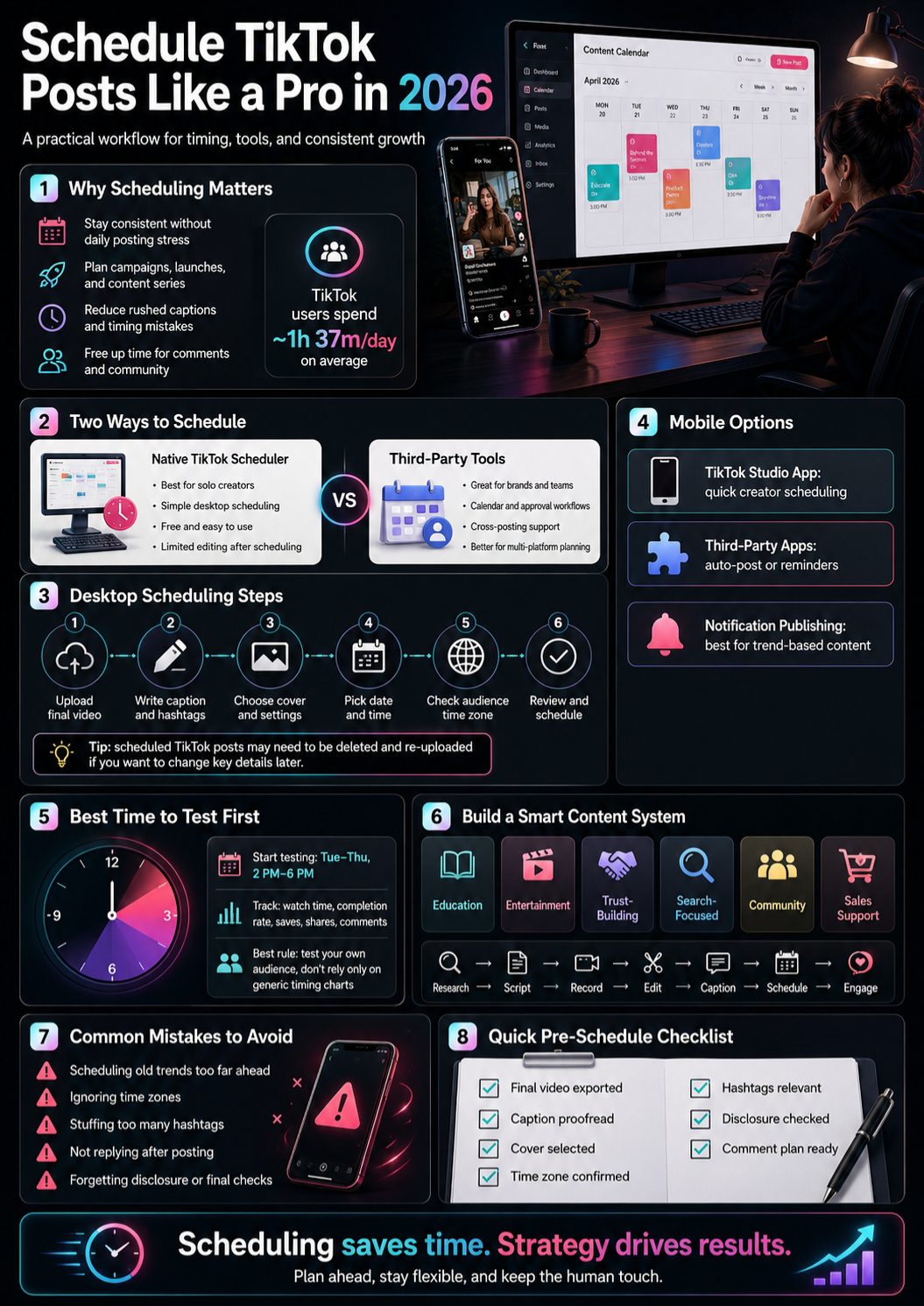
The best time to post on TikTok is not universal. A food brand, travel page, gaming creator, and B2B software company will not have the same audience routine.
Use your TikTok analytics first. Look at follower activity, past video performance, watch time, completion rate, saves, shares, and comments. If your followers are active at night, do not post at noon just because a generic study said so.
That said, benchmark data can help when you are starting from zero. Sprout Social’s 2026 TikTok timing report found that overall strong posting windows include Tuesday to Thursday from 2 p.m. to 6 p.m. local time, with Wednesday having a wider window from 1 p.m. to 8 p.m.
The practical move is simple: test three time blocks for 30 days. Try one afternoon slot, one evening slot, and one niche-specific slot. Then compare results.
Timing Test Plan
Do not judge timing from one post. TikTok performance depends on hook, topic, retention, audience match, and competition.
Test at least 12 to 20 posts before making strong claims. Keep the format similar where possible, so your timing test is not ruined by completely different content types.
|
Testing Area |
What to Track |
|
Posting time |
Date, hour, and audience time zone |
|
Video topic |
Tutorial, trend, review, story, reply |
|
Retention |
Average watch time and completion rate |
|
Engagement |
Comments, saves, shares, profile visits |
|
Search value |
Keyword in caption, on-screen text, spoken words |
|
Result |
Best repeatable time slot |
How to Choose the Right TikTok Scheduler
The best TikTok scheduler is the one that matches your workflow. Do not buy a complicated tool if you only post three videos a week. Also, do not force a free native tool to handle an agency-level content operation.
For individuals, TikTok’s own scheduler or TikTok Studio may be enough. For teams, look for approval workflows, content calendar views, multi-account support, analytics, permission controls, and cross-platform scheduling.
If a tool uses TikTok’s direct publishing options, check whether it is clear about account authorization and permissions. TikTok’s Direct Post system requires creators to connect their TikTok account to the third-party platform, and TikTok says partners go through an audit process before access is granted.
Also check whether the tool supports your content format. Some tools may support videos but not photo carousels. Some may support auto-publishing but not trending audio workflows.
Scheduler Selection Checklist
Before choosing a scheduler, ask what you actually need. A creator needs speed. A brand needs review controls. An agency needs client separation. A publisher needs volume and reporting.
|
Feature |
Why It Matters |
|
Auto-publishing |
Saves manual posting time |
|
Notification publishing |
Helps with trending audio and final checks |
|
Calendar view |
Makes campaigns easier to manage |
|
Approval workflow |
Useful for teams and clients |
|
Multi-account support |
Important for agencies and publishers |
|
Analytics |
Helps improve timing and content choices |
|
Editing after scheduling |
Useful when campaigns change |
Common TikTok Scheduling Mistakes to Avoid
The biggest mistake is treating scheduling as automation without judgment. TikTok is too trend-sensitive for that. A video scheduled two weeks ago may feel stale today if the sound, meme, or news hook has already moved on.
Another mistake is ignoring comments after publishing. A scheduled post still needs human attention. The first hour after posting is often when you should reply, pin useful comments, answer questions, and watch how people react.
Many accounts also use too many hashtags. TikTok captions should help the platform and users understand the content, but hashtag stuffing makes posts look desperate. Use a few relevant hashtags, not a wall of random tags.
The last big mistake is forgetting compliance. If your post includes paid promotion, gifted products, AI-generated content, or brand partnerships, check TikTok’s disclosure options before scheduling.
Pre-Schedule Review
A simple checklist can save you from embarrassing mistakes. Use it before every scheduled post.
|
Mistake |
Better Habit |
|
Scheduling old trends |
Review trends before publish day |
|
Wrong time zone |
Schedule based on audience location |
|
No comment plan |
Be active after the post goes live |
|
Weak caption |
Use a clear hook and natural keywords |
|
Too many hashtags |
Use only relevant tags |
|
No disclosure |
Check branded or AI content settings |
|
Posting too much promo |
Balance value and sales content |
TikTok SEO Tips for Scheduled Posts
TikTok SEO matters more than many creators admit. Users search TikTok for tutorials, reviews, product ideas, recipes, travel tips, fitness routines, software advice, and quick answers. If your video is helpful, searchable, and well-timed, scheduling can support long-term discovery.
Use your main phrase naturally in the caption, on-screen text, and spoken audio when it fits. For example, if your video teaches people how to schedule TikTok posts, say the phrase clearly in the opening line and include it in the caption.
Do not write robotic captions. A good TikTok SEO caption sounds like something a real person would type. It should explain the topic, add context, and invite a useful response.
TikTok’s Creative Center Trends section also helps creators track trending hashtags, songs, creators, and videos by region and industry. TikTok says Trends can help users understand community interests and use those signals in organic and paid messaging.
Caption and Keyword Formula
A strong caption can be short. The goal is not to write an essay. The goal is to make the video easy to understand.
Use this simple structure: hook, keyword, context, soft action.
Example: “Trying to schedule TikTok posts without missing peak hours? Here’s the workflow I use to plan a full week in under 30 minutes.”
|
TikTok SEO Element |
How to Use It |
|
Spoken keyword |
Say the topic in the first few seconds |
|
On-screen text |
Add a clear title or problem |
|
Caption |
Use natural search phrases |
|
Hashtags |
Add niche-relevant tags |
|
Cover text |
Make the profile grid easy to scan |
|
Comments |
Reply with extra keyword-rich answers |
A Simple Weekly TikTok Scheduling Workflow
A weekly workflow keeps the process realistic. You do not need to spend every day thinking about what to post. Batch the heavy work, then leave room for live reactions.
Start with research. Check TikTok analytics, Creative Center, competitor posts, customer questions, and search queries. Pick topics that match your audience, not just trends that look popular.
Next, script or outline your videos. Keep each video focused on one idea. TikTok viewers do not want five topics squeezed into one messy clip.
Then record, edit, write captions, choose covers, and schedule. Before each post goes live, do a quick review to make sure the trend, caption, and timing still make sense.
Weekly Planning Example
This workflow works for creators, small businesses, and editorial teams.
|
Day |
Task |
|
Monday |
Review analytics and pick topics |
|
Tuesday |
Script or outline videos |
|
Wednesday |
Record and edit |
|
Thursday |
Write captions and choose covers |
|
Friday |
Schedule evergreen posts |
|
Weekend |
Leave room for trends and replies |
Final Thoughts
Learning how to schedule TikTok posts is not about removing the human part of TikTok. It is about protecting it. When your publishing process is planned, you have more time to make better videos, write stronger captions, reply to comments, and watch what your audience actually cares about.
The smartest creators in 2026 are not posting randomly and hoping the algorithm feels generous. They are building repeatable systems. They test timing, track performance, leave room for trends, and use scheduling tools without becoming lazy.
Use TikTok’s native scheduler if your needs are simple. Use a third-party scheduler if you manage multiple accounts, need approvals, or plan far ahead. Most importantly, do not schedule and disappear. A scheduled TikTok still needs a human behind it.
FAQs About Schedule TikTok Posts
Can You Schedule TikTok Posts for Free?
Yes, many creators can schedule TikTok posts using TikTok’s own scheduling options, depending on account type, region, and available features. Free third-party plans may also exist, but they often come with limits on accounts, posts, or analytics.
Does Scheduling TikTok Posts Hurt Reach?
Scheduling itself does not automatically hurt reach. Poor timing, weak hooks, low retention, irrelevant captions, and no engagement after publishing are bigger problems. Review the post before it goes live and be active after publishing.
Can You Edit a Scheduled TikTok Post?
TikTok’s official Video Scheduler guide says scheduled videos, captions, and scheduled times cannot be edited after scheduling. If something needs to change, you must delete the scheduled post and upload it again.
Should I Schedule TikTok Posts With Trending Sounds?
Be careful. Trending sounds can change quickly. If the sound is central to the video, notification publishing or same-day scheduling may be safer than scheduling far ahead.
How Many TikTok Posts Should I Schedule Per Week?
There is no perfect number. Start with three to five strong posts per week if you want consistency without burning out. Increase only when you can keep quality, comments, and analytics review under control.
Can Businesses Use TikTok Scheduling for Campaigns?
Yes. Scheduling is useful for launches, seasonal campaigns, product demos, event coverage, and educational series. Businesses should also check disclosure settings, brand safety, and comment response plans before scheduling.