
Ever wondered who checked out your Twitter profile? If you’ve typed “who viewed Twitter profile” into the search bar, you’re not alone. Curiosity is natural. Maybe it’s a crush, a recruiter, a client, or just a casual browser.
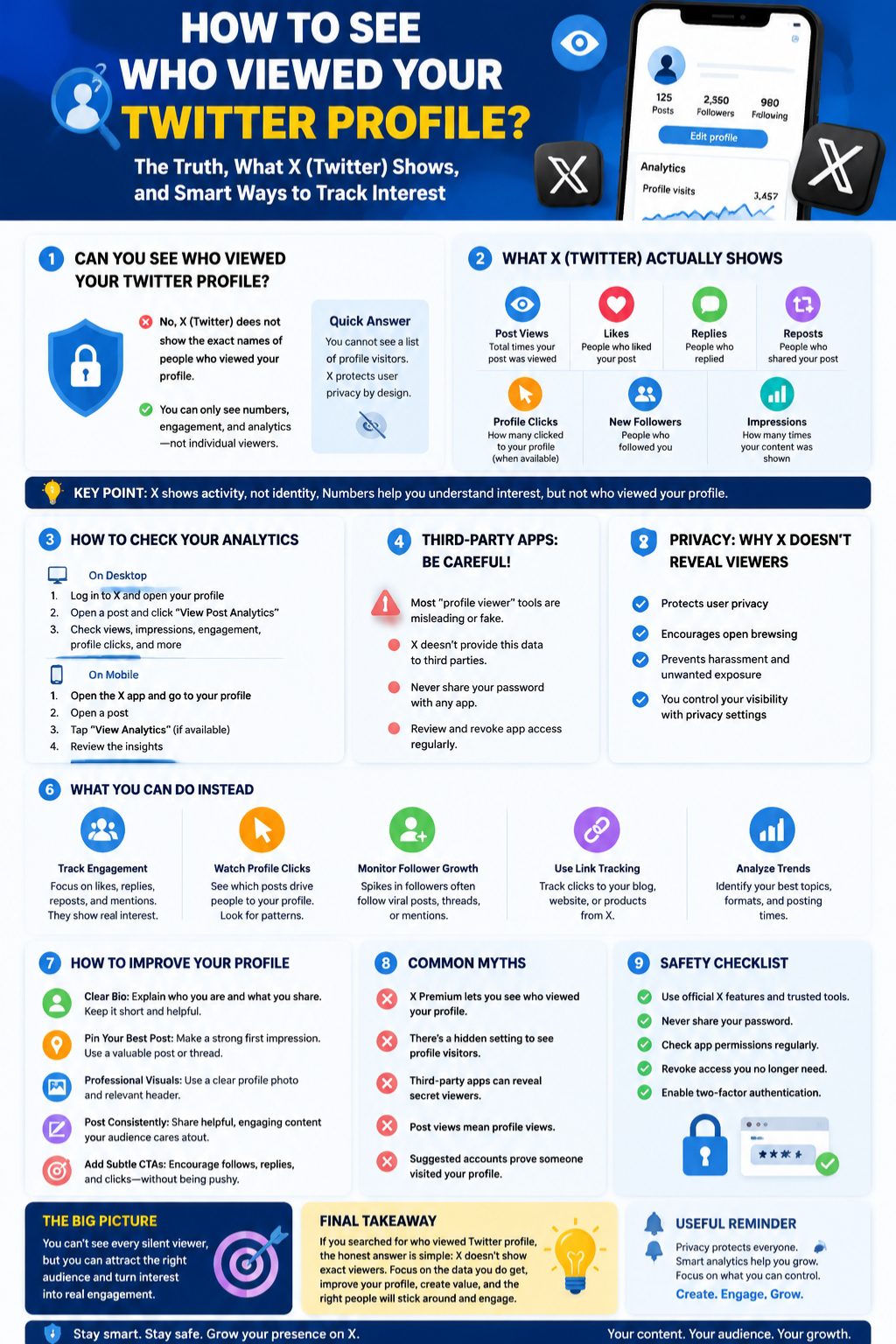
Here’s the kicker: Twitter, now X, doesn’t let you see a list of everyone who visits your profile. But there’s still a lot you can track. From post views and engagement to profile clicks and follower spikes, you can get a pretty clear idea of who’s interested without relying on sketchy third-party tools.
In this guide, I’ll break down exactly what X shows, how to use analytics safely, and practical tips to make your profile more engaging—all while keeping your curiosity satisfied.
Can You Actually See Who Viewed Your Twitter Profile?
The Direct Answer
Simply put: you cannot see the names of everyone who views your profile. X doesn’t provide a feature for that. The closest you get are numbers, trends, and engagement insights.
Trying to track visitors with apps that claim to reveal “secret viewers” is mostly a trap. These tools either guess based on engagement or are outright unsafe.
Why People Ask This
People want to know if a particular follower, employer, or competitor has checked their profile. Creators and businesses want to understand who’s showing interest. Curiosity is natural—but so is respecting privacy.
|
Question |
Reality |
|
Can I see every visitor? |
No, X does not provide a visitor list |
|
Are third-party apps reliable? |
Usually not; they guess or misuse your data |
|
Can analytics help? |
Yes, you can track trends, clicks, and engagement |
What Twitter/X Actually Shows You
Post Views
Every tweet you post has a view count. These numbers tell you how many people saw your post, but not who. It’s a good way to measure reach, but it doesn’t reveal identities.
Impressions and Engagement
Engagement metrics like likes, replies, and reposts give more actionable insights.
|
Metric |
Shows You |
Does Not Show |
|
Post Views |
Total times seen |
Individual viewers |
|
Likes |
Who liked |
Silent viewers |
|
Replies |
Who responded |
Non-engagers |
|
Reposts |
Who shared |
Who viewed only |
|
Profile Clicks |
How many visited profile |
Exact visitor names |
Profile Visits or Profile Clicks
Some accounts see profile clicks or profile visits in analytics. These numbers are helpful for spotting trends, but they don’t identify individuals.
Follower Growth
Follower spikes can indicate interest in a tweet or topic. While you see new followers, you still won’t see everyone who browsed your profile.
How to Check Available Twitter/X Analytics
On Desktop
- Log in to X.
- Open your profile.
- Click on a tweet to view analytics.
- Check impressions, engagements, and profile clicks.
- Compare patterns across tweets.
Read Also: How to Recover Suspended X (Twitter) Account
On Mobile
- Open the X app.
- Go to your profile.
- Tap on a post.
- Look for view count or analytics.
- Review engagement and profile signals.
What to Look For
|
Observation |
Insight |
|
High views, low engagement |
Post reached many but didn’t motivate action |
|
Low views, high replies |
Smaller but highly interested audience |
|
Profile click spike |
Post drove visitors to profile |
|
Follower increase |
Content caught attention and prompted follow |
Can Third-Party Apps Show Who Viewed Your Twitter Profile?
Why Most Tools Are Misleading
Apps claiming to show profile viewers cannot access that info directly. They rely on guesses or partial engagement data.
Common Red Flags
- Requests for your X password
- Promises to reveal “stalkers”
- Surveys or payments before showing data
- Unclear company info or fake reviews
- Random usernames displayed
What They Actually Do
Some apps track likes, reposts, follower changes, or mentions. That’s real engagement, not silent visitor tracking.
|
Tool Claim |
Reality |
|
See everyone who viewed profile |
Not possible |
|
Identify secret stalkers |
Usually a guess |
|
Free profile viewer |
Often requires unsafe permissions |
Privacy: Why X Does Not Show Exact Profile Viewers
Viewer Privacy
A public visitor list would make browsing awkward. Many people check profiles for normal reasons—research, networking, or curiosity.
Public Profiles Are Still Public
If your account is public, anyone can see your tweets and profile info. Protecting posts limits visibility but doesn’t reveal who visited.
Protected Posts Are Different
Protected posts hide content from non-followers, but still do not create a list of viewers.
What You Can Use Instead
Check Engagement
Likes, replies, reposts, and mentions are visible. They show real interaction.
Watch Profile Clicks
Profile click metrics can help you see which posts drive interest. Compare topics, formats, and posting times.
Track Follower Changes
A sudden increase in followers often follows a popular post or shared thread.
Monitor Mentions and Search
Mentions and replies provide context about who is interacting with your profile.
Use Link Tracking
For creators and businesses, link tracking can measure interest without knowing every profile visitor.
|
Method |
Benefit |
|
Engagement metrics |
Real interaction insight |
|
Profile clicks |
See content that drives visits |
|
Follower changes |
Track growth trends |
|
Link tracking |
Understand off-platform traffic |
How to Understand Silent Viewers
Silent Views Are Normal
Most people browse without engaging. That’s expected.
Don’t Overread One Metric
A spike in views doesn’t always mean interest—it could be timing, hashtags, or algorithm boosts.
Look for Patterns
Track topics, formats, posting times, threads, and bio changes over time to spot consistent trends.
How to Improve Your Profile
Make Your Bio Clear
A precise bio communicates who you are and what you post.
Use a Strong Pinned Post
Pin your most important tweet, thread, or portfolio.
Profile Visuals
Profile photo, header, name, handle, and links matter.
Post With Clear Topics
Focus on topics your audience cares about to increase engagement.
Light Calls to Action
Encourage follows, replies, or clicks naturally without being pushy.
|
Improvement |
Why It Matters |
|
Clear bio |
First impression counts |
|
Pinned post |
Highlights your best content |
|
Profile visuals |
Builds trust |
|
Focused posts |
Drives targeted engagement |
|
Light CTAs |
Encourages interaction |
Common Myths
- Twitter shows hidden profile visitors – false
- X Premium reveals viewers – false unless official
- Third-party apps are accurate – mostly false
- Post views = profile views – false
Safety Checklist
- Verify tool claims
- Check permissions
- Never share your password
- Revoke access if suspicious
Best Ways to Know Who’s Interested
- Track regular engagement
- Observe repeat interactions
- Use polls and questions
- Track link clicks
- Compare profile changes
Should You Care?
- Regular users: Focus on privacy, don’t stress over silent views
- Creators: Track engagement and clicks
- Businesses: Focus on leads, follows, engagement quality
- Job seekers: Optimize profile, professional first impression matters
Final Thoughts
Searching for “who viewed Twitter profile” is natural. The honest truth? You can’t see exact viewers. But you can track engagement, profile clicks, and follower patterns to gauge interest. Skip sketchy apps, and focus on improving your profile to attract the right audience.
FAQs
Can I see exactly who viewed my profile?
No, X does not provide a visitor list. Use engagement metrics instead.
Does Twitter Analytics reveal profile visitors?
Only aggregate numbers like impressions, profile clicks, and engagement, not names.
Can X Premium show profile viewers?
Not for exact visitors. Check official features.
Are Twitter profile viewer apps safe?
Most are misleading or unsafe. Stick to official metrics.
Can someone know I viewed their profile?
No, unless you engage publicly via likes, replies, reposts, or follows.